12-Amethyst
May 23, 2023
Solved

Table pattern is not taking absolute coordinate system as a reference

  • May 23, 2023
  • 10 replies
  • 4599 views

Hi Every one,


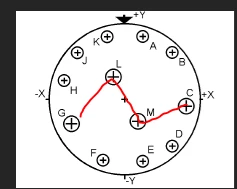
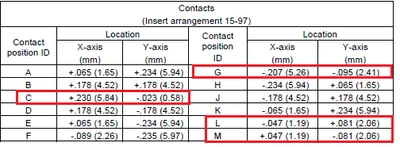
My requirement is to create an irregular pattern of holes. I have 'X' and 'Y' dimensions of points where holes to be made and will create a family table of patterns.

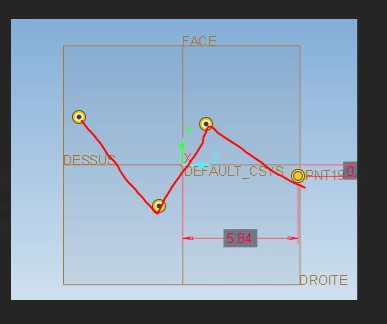
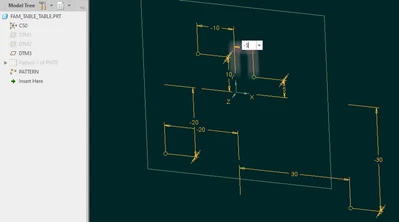
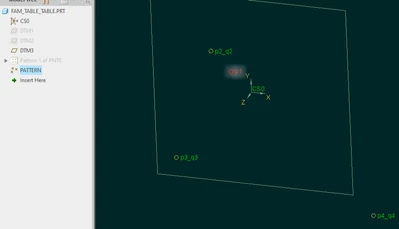
but, after creating table pattern the points are reversely plotted (-ve became positive and positive became -ve). I think it is taking relative position instead of absolute positions. I can reverse the signs to get the proper results but I have to use the exact values of 'X' and 'Y' dimensions.


I have attached the snaps of the problem I am facing. please help.
 

SC_8321054_0-1684822252660.pngSC_8321054_1-1684822289489.png


SC_8321054_2-1684822308274.png


Best answer by pausob

Yes, I believe you describe the table pattern behaviour correctly and I suppose it works according to specification that all pattern members will be re-arranged to adapt to the new "sense" of the leader instance dimensions.  I don't think there is a way of specifying that the table pattern instances will be located according to some "absolute" coordinate system.  (if you could suppress the 1st instance in a pattern, then the work-around could be to have the 1st point be in the 1st quadrant)


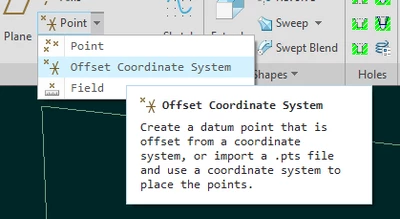
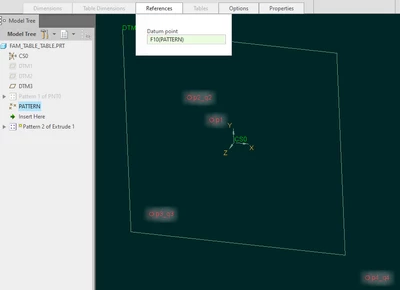
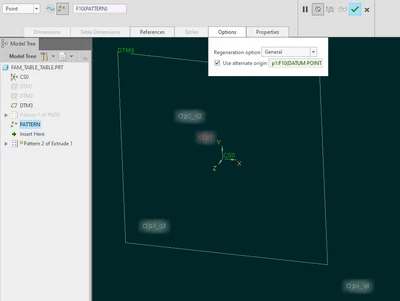
So I suggest using point-based patterns and specifying the points using sketches, or the "offset-coordinate-system":

pausob_0-1685112903732.png

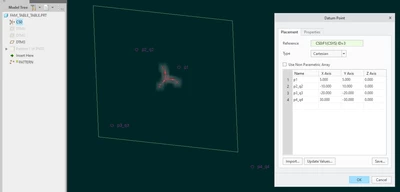
For example, define your point field:

pausob_1-1685112949961.png

now editing the 1st point, you can specify its placement in the 2nd quadrant: 

pausob_2-1685112974206.png

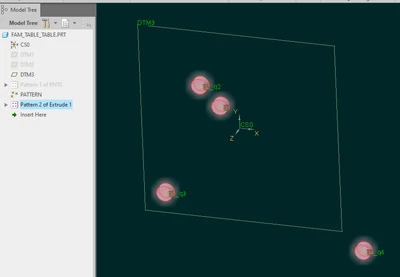
and the other points "stay in their place":

pausob_4-1685113052628.png


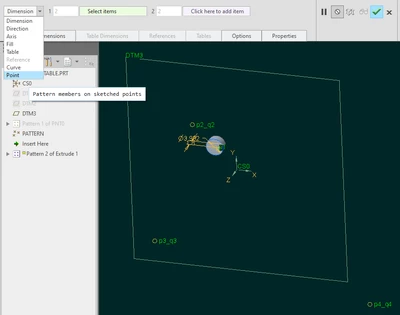
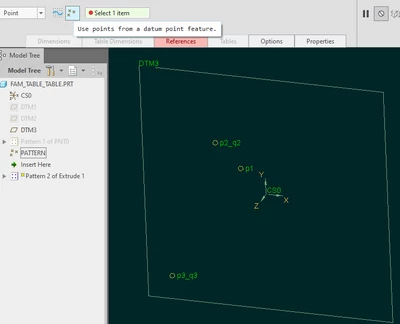
Then you pattern your feature by using "by point" method:

pausob_5-1685113404678.pngpausob_6-1685113428501.png

pausob_7-1685113453786.pngpausob_8-1685113473296.png


--> 

pausob_9-1685113489010.png


10 replies

24-Ruby III
May 23, 2023

Hi,

in Family Table you have to set absolute dimension values

MartinHanak_0-1684833397042.png

MartinHanak_1-1684833475132.png


12-Amethyst
May 24, 2023

Hi Martin,

  • I have selected the family item item as feature so the absolute coordinate option is not available.

we have multiple hole arrangements in each size of part. 

for example: Size 9 (S9) has 9 to 10 various type of hole arrangements.

                        S11 has again 8-9 different hole arrangements. this way we have total 9 sizes S9, S11, S13...…. S25.

and each size has different 8 to 9 hole arrangement.

  • so for these I am creating UDF under which I have defined the family table which shows instances of each size. each instance will have different arrangement of hole. please help....!

SC_8321054_1-1684897849827.png


SC_8321054_0-1684897671576.png


24-Ruby III
May 24, 2023

Hi,

to understand your problem I need to open your model. Please pack it into zip file and upload this zip file.

pausob19-TanzaniteAnswer
19-Tanzanite
May 26, 2023

Yes, I believe you describe the table pattern behaviour correctly and I suppose it works according to specification that all pattern members will be re-arranged to adapt to the new "sense" of the leader instance dimensions.  I don't think there is a way of specifying that the table pattern instances will be located according to some "absolute" coordinate system.  (if you could suppress the 1st instance in a pattern, then the work-around could be to have the 1st point be in the 1st quadrant)


So I suggest using point-based patterns and specifying the points using sketches, or the "offset-coordinate-system":

pausob_0-1685112903732.png

For example, define your point field:

pausob_1-1685112949961.png

now editing the 1st point, you can specify its placement in the 2nd quadrant: 

pausob_2-1685112974206.png

and the other points "stay in their place":

pausob_4-1685113052628.png


Then you pattern your feature by using "by point" method:

pausob_5-1685113404678.pngpausob_6-1685113428501.png

pausob_7-1685113453786.pngpausob_8-1685113473296.png


--> 

pausob_9-1685113489010.png


12-Amethyst
May 27, 2023

I was expecting the same thing. I will go with point method.


Thanks.