
1-Visitor
May 25, 2016
Solved

Text Going out of Template After conversion from Creo to Autocad Drawing

  • May 25, 2016
  • 1 reply
  • 7557 views

After creating drawing in creo ,When i convert creo drawing to auto cad drawing ,after opening the converted auto cad drawing the text are going out of the template boxes ,then i have to Readjust,and change text style which is totally annoying considering i have to id in around about more than 100 drawings which takes lot of time


1. Is their any way by which i can stop text going out of content box after conversion to auto cad from Creo.

2. I am Attaching a image few of lines are hidden due to Privacy concern.

3. in the image you can see that text have gone out of template which was okay in creo drawing.


Thank you all


hoping for a better solution
Best answer by MartinHanak

Hi,

now I know that you use font named font in Creo drawing. This font is not available in AutoCAD, this fact is the source of your problem.

Solution no.1

Change your Creo default font to TrueType font available in AutoCAD. In this case both Creo and AutoCAD will use the same font to display texts and result will be the same.

Solution no.2

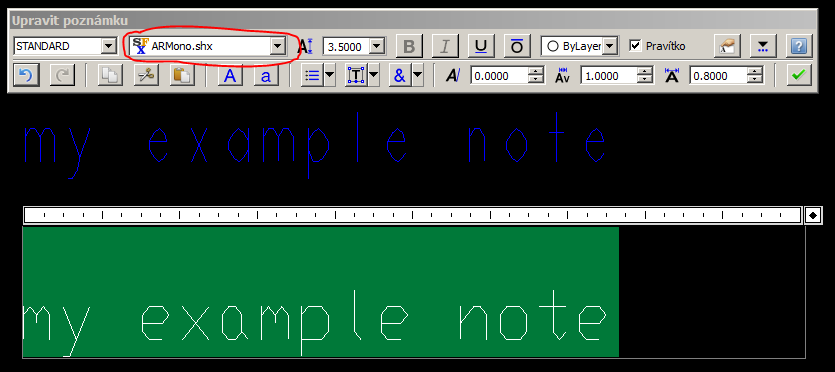
Export your current drawing using Stroke All Characters option. Open DWG in AutoCAD and you will see the same "picture of text" as in Creo. Create new note in AutoCAD and experiment with font setting. Find which AutoCAD font is similar to Creo font named font. See following example picture which was taken in Draftsight application.

armono.png

  • upper blue note was exported from Creo using Stroke All Characters option
  • lower note was created in Draftsight application, the length of note is almost the same as length of blue note

Now export your current drawing using As Text option and define mapping of font named font to similar font (in my case it is ARMono.shx). Open DWG in AutoCAD and check the result.

MH

1 reply

24-Ruby III
May 25, 2016

Hi,

during export to DWG in configuration dialog box you can specify text font mapping between Creo and DWG. This way you can achive requested result.

map.png

MH

1-Visitor
May 26, 2016

Hi,

Thank you for the solution ,but still the problem is not solved properly, by above method text style got changed but the text goes out of template drawing, i have attached a JPEG file in the previous post ,

Thank you

24-Ruby III
May 26, 2016

Hi,

please attach picture of original Creo drawing.

What application did you use to open DWG file, when you created first picture ?

Did you export text As text -OR- did you use Stroke All Characters​ option ?

MH