14-Alexandrite
October 10, 2023
Solved

TEXTURE TRANSPARENCY

  • October 10, 2023
  • 3 replies
  • 1491 views

Hi, how can I model texture for represent a metallic network?

Best regards.


Michele Barile

 

Best answer by BG_9869104

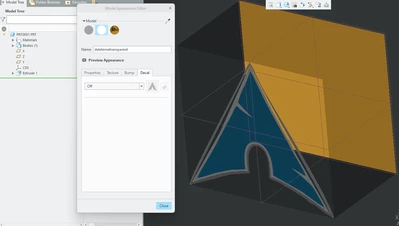
Hmm, You can set the model to a transparent appearance. Then set a surface/s to have a decal on them. If the decal has transparent background you can see through anywhere on the surface not covered by the decal. So if you can make a or find a mesh image with no background and apply to the surface you can see through it. This Arch Linux icon was the first no background image result I could find. I set the blocks transparency to 90% so you could see it was there and the back wall to a color to be able to tell you are seeing through the object to the back side.

Screenshot 2023-11-15 132909.png

3 replies

5-Regular Member
October 16, 2023

Hi MB_10508968,


Thank you for your question.

I encourage you to bring more details and context to your initial inquiery. 


For example, screenshots are useful to better understand what you are trying to do and will also increase your chance to receive meaningful help from other Community members.

15-Moonstone
October 16, 2023

I'm guessing what you're after is a texture that is partially transparent, like a wire mesh. Having it transparent in between the wires, while the wires still being seen? Unfortunately, I don't think this is possible in Creo today. You can have textures, and you can have transparency, but I don't think the textures can have some parts transparent and others not.

14-Alexandrite
November 15, 2023

Hmm, You can set the model to a transparent appearance. Then set a surface/s to have a decal on them. If the decal has transparent background you can see through anywhere on the surface not covered by the decal. So if you can make a or find a mesh image with no background and apply to the surface you can see through it. This Arch Linux icon was the first no background image result I could find. I set the blocks transparency to 90% so you could see it was there and the back wall to a color to be able to tell you are seeing through the object to the back side.

Screenshot 2023-11-15 132909.png