

1-Visitor
September 8, 2015
Solved

Toolbar "Table" delay

  • September 8, 2015
  • 2 replies
  • 2309 views

Dear all,

      using Creo 2.0 M100 and every time I'm working on a drawing model, when clicking the first time on the toolbar "Table" (to perform a baloons creation, repeat region operations, etc...) I must wait at least 15 seconds before to start typing some other commands. The mouse pointer remain in loading status for an unidentifyed reason.
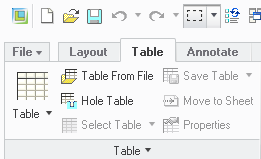
Toolbar_Table.PNG


This is not a big problem but of course a waste of time that with ProE WF2.0 we didn't experienced before. Is someone having the same "disturb"? Do someone knows how to set off this issue?


Thanks in advance

Fabio


This thread is inactive and closed by the PTC Community Management Team. If you would like to provide a reply and re-open this thread, please notify the moderator and reference the thread. You may also use "Start a topic" button to ask a new question. Please be sure to include what version of the PTC product you are using so another community member knowledgeable about your version may be able to assist.
Best answer by Mahesh_Sharma

Fabio,

In addition to information from Amit, check earlier post Creo goes to not responding mode after click on Table menu

It may have some information of your interest.

2 replies

18-Opal
September 10, 2015

Hi Fabio,

I have seen other customer issues, with a delay after activating the Table or Annotate tab.  The issue could be cause by an extremely large number of tables or annotations that need to be updated or it could be a drawing specific issue, where this is some slight corruption in a particular area of the the drawing, that causes the delay.

If you are NOT seeing this issue on all of your drawings, it could be drawing specific and perhaps opening a Tech Support Case and providing the files, would help.

If you are seeing this on ALL your drawings, you could try on another machine, to see if the issue is specific to your machine.

If it is, then I would suggest checking the graphics card and driver version for your machine configuration, to verify that it is certified or supported.  You can find this information on the Platform Support page; click on the By Product drop down and select your product, e.g. PTC Creo 2.0.

Thanks,

Amit

Mahesh_Sharma
22-Sapphire I
September 18, 2015

Fabio,

In addition to information from Amit, check earlier post Creo goes to not responding mode after click on Table menu

It may have some information of your interest.

1-Visitor
October 12, 2015

Thanks Mahesh,

now the "waiting time zone" is disappeared.

Regards

Fabio