

Dale_Rosema
23-Emerald III
23-Emerald III
February 4, 2022
Solved

Trying to find a part in an assembly that is "no longer there"

  • February 4, 2022
  • 4 replies
  • 10980 views

In an assembly, one part was swapped out with another. The old part was deleted.

The assembly model is still looking for the old part even though it cannot be found in the model tree.

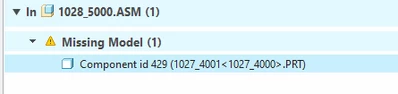
The message is:
 

Dale_Rosema_0-1643986999400.png


If the model 1027_4000 and its instance 1027_4001 are recreated, the assembly is "happy". (Still do not see it in the model tree.) Clear memory and rename it ZZ1027_4000 and the error returns.


How can I find: Component id 429 in my assembly.

Thanks,

Dale
Best answer by Dale_Rosema

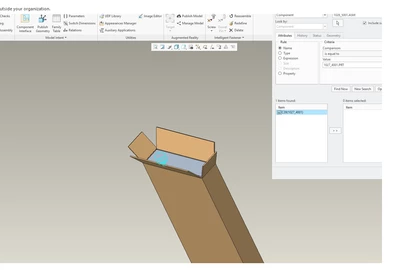
With the help of @StephenW , the suggestion was to use the find tool, component selected, and search for 1027_4001.prt.

I did this in the generic. Used the >> to move it to the right box. Selected it in the right box and clicked on "Remove".

Saved the generic. Exited, cleared memory, modified the name of the model (added zz in front) to zz1027_4000.prt.

Re-opened the generic, and the model lived "happily ever after"....


THANKS STEPHEN!!!!


Dale_Rosema_0-1645112104504.png


4 replies

Dale_Rosema
23-Emerald III
23-Emerald III
February 4, 2022

From the model info:


Dale_Rosema_0-1643987370797.png


and this


Dale_Rosema_1-1643987440178.png


Dale_Rosema
23-Emerald III
23-Emerald III
February 4, 2022

Somehow I generated a .inf file for the parent assembly. In it is the following for the "missing part".


FEATURE NUMBER 49
INTERNAL FEATURE ID 565
PARENTS = 3(#2)
TYPE = PATTERN

LEADER OF A (4 X 1) DIM VARYING PATTERN


MAIN PATTERN DIMENSIONS:
d86 = (Displayed:) .000
( Stored:) 0.0 ( 0.001, -0.001 )
d87 = (Displayed:) .000
( Stored:) 0.0 ( 0.001, -0.001 )
d88 = (Displayed:) .000
( Stored:) 0.0 ( 0.001, -0.001 )
d92 = (Displayed:) .000
( Stored:) 0.0001 ( 0.001, -0.001 )
d93 = (Displayed:) 2.906
( Stored:) 2.906 ( 0.001, -0.001 )

********************

tbraxton
22-Sapphire II
22-Sapphire II
February 4, 2022

The reference viewer should show the reference path for the missing part. If you are not able to delete this child reference in the assembly then you can try to "fool" Creo to get rid of it. If you are unable to delete the reference post back and I can suggest how to try a fix to get rid of the reference. 


You will need to create a dummy component with the name of this missing part and reestablish the link in the assembly. Once you do that you may be able to delete the component resolving this unwanted reference. it may be more complicated depending on the nature of the parent/child refs.

kdirth
21-Topaz I
21-Topaz I
February 4, 2022

I expect that you had the Remember These Components checked in the replace dialog box.

kdirth_0-1643991260950.png

I would suggest looking for it in the assembly using reference viewer.  Hopefully it is there with a trash can on the link for you to select.

There is always more to learn.
23-Emerald III
February 4, 2022

The source of endless number of unexpected references since I use replace regularly.

Set the config.pro option:

remember_replaced_components NO 

to automatically un-check the box, my preference since it is rare to be changing back and forth.

Dale_Rosema
23-Emerald III
23-Emerald III
February 4, 2022

I think I have that config options set already because on another change I recently made with an unrelated component, the box was unchecked.

Dale_Rosema
23-Emerald III
23-Emerald III
February 16, 2022

Trying another approach.

I recreated/renamed the missing component and the error goes away.

I cannot find the part in the model tree.

Can someone point me in the right direction to find and break any relations with this part now that it is "back"?


Thanks, Dale

Dale_Rosema
23-Emerald III
23-Emerald III
February 16, 2022

Dale_Rosema_0-1645040674412.png