3-Newcomer
April 1, 2023
Solved

trying to pattern a marker around axis with keeping the marker direction upward

  • April 1, 2023
  • 2 replies
  • 1343 views

in the attached pics you can find the drawing done on another software using for loop, how to implement that on Creo, and is that possible to do using for loop in the parametric drawings?

I need to draw this marker on each slot and it should be all the time upward (circle with a line getting from with 90 degrees wrt x-axis) as shown in the pics 

any help or tips would be so appreciated

Best answer by pausob

Not sure how to do this in drawing mode.

Pretty sure you cannot use for loops or other such "advanced" programming in drawing mode.


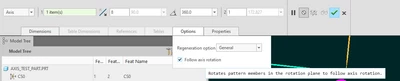
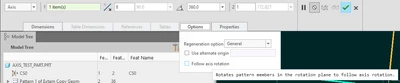
But you can make your marker as a sketch in part mode and then pattern it (axis pattern), unchecking the option to "follow axis rotation":

pausob_1-1680359230498.png

pausob_6-1680359506456.png


vs:

pausob_3-1680359298752.png

pausob_5-1680359488368.png


2 replies

pausob19-TanzaniteAnswer
19-Tanzanite
April 1, 2023

Not sure how to do this in drawing mode.

Pretty sure you cannot use for loops or other such "advanced" programming in drawing mode.


But you can make your marker as a sketch in part mode and then pattern it (axis pattern), unchecking the option to "follow axis rotation":

pausob_1-1680359230498.png

pausob_6-1680359506456.png


vs:

pausob_3-1680359298752.png

pausob_5-1680359488368.png


3-Newcomer
April 6, 2023

Thanks, very helpful.