
1-Visitor
March 2, 2016
Question

Two Values in Model Edit

  • March 2, 2016
  • 3 replies
  • 2413 views

Hello:

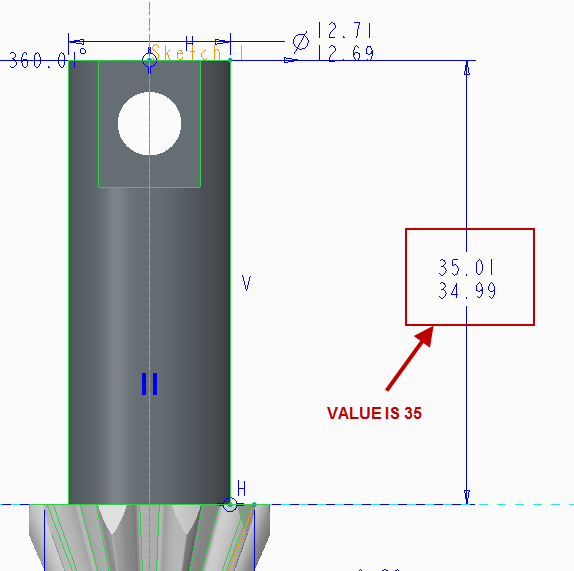
Creo 2.0.....I select a feature on a model, right-click and select the Edit option. I get two dimensions, which actually frame the current value I am trying to change. Example; a 35.00 dimension displays as 35.01 and 34.99 below it. And when I change one/both, the feature does not update.

This feels like a setting, but as an intermittent user, these are the things that trip me up.

Thanks,

Joe

This thread is inactive and closed by the PTC Community Management Team. If you would like to provide a reply and re-open this thread, please notify the moderator and reference the thread. You may also use "Start a topic" button to ask a new question. Please be sure to include what version of the PTC product you are using so another community member knowledgeable about your version may be able to assist.

3 replies

12-Amethyst
March 2, 2016

My guess is that you have a drawing assigned to this part.

change the value in the drawing then regen

23-Emerald III
March 2, 2016

You need to click on the dimension properties and set the dimension display back to nominal from limits. Then you can change the value. I get frustrated by this a lot on older designs.

1-Visitor
March 2, 2016

Thanks Ben. That did the trick.

And this is an old training part.

Joe

Dale_Rosema
23-Emerald III
March 2, 2016

If you upgraded from an older version of Croe/WF, the dimensions were defaulted to Limits. You need to go in and change them to Nominal.

Thanks, Dale

1-Visitor
March 2, 2016

Thanks Dale, I'll look into that.

Joe

Dale_Rosema
23-Emerald III
March 3, 2016

You're welcome.