
1-Visitor
April 26, 2022
Solved

Unable to open cosmetic thread interface

  • April 26, 2022
  • 1 reply
  • 2353 views

I am unable to open the user interface of cosmetic thread. Whenever I click on the cosmetic thread tab
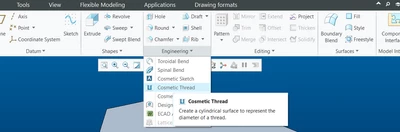
 

ZG_10194871_0-1650974868985.png

it takes me to some intudfs folder having two folders inside (External and Internal) containing .gph files.
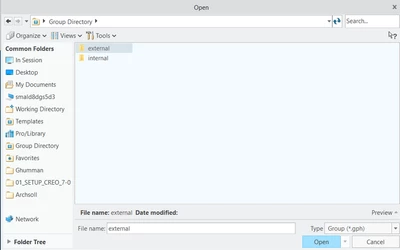
ZG_10194871_1-1650975002068.png


I'm not sure if it is some kind of bug or do I have to modify some parameter in config.


Any help would be greatly appreciated.


Thanks.

 

Best answer by Mahesh_Sharma

@ZGhumman 


You may check the option in config.pro and config.sup on your machine.

Thanks. 

1 reply

Mahesh_Sharma
22-Sapphire I
April 26, 2022

Hi @ZGhumman 


Set config option allow_udf_style_cosm_threads as no (default). I hope that will help.


Thanks 

ZGhumman1-VisitorAuthor
1-Visitor
April 26, 2022

It's already set as default (i.e. No).

ZG_10194871_0-1650976984953.png


23-Emerald III
April 26, 2022

@ZGhumman 

The Asterisk next to no means that no is default, it does not mean your setting is no.

If you don't have a line in your config(s) that specifically changes it to yes, then it is by default no.

You HAVE to look at the lines in your config files to verify.

I don't have that option set, but as an example, on my config

Allow_freeze_failed_assy_comp YES (no asterisk mean it is not set to default, ie I have changed the option from default)

Allow_red_interstection NO* (asterisk means the setting is the default setting AND I have it specified in one of my config.pro files explicitly as NO)


All I am saying is using "find" won't necessarily tell you what you have it set to


StephenWilliams_0-1650977799198.png