14-Alexandrite
September 29, 2025
Solved

UNLINK IMPORTED FEATURE

  • September 29, 2025
  • 2 replies
  • 419 views

Hi,


I have a lot of "imported feature" files that seem to slow the parent assembly when opening, rotating and zooming the view.

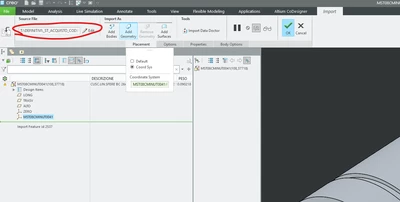
I believe this is related to the fact that CREO 9.0 tries to access the local path T:\DEFINITIVI\... linked to the imported 3D model: is there a way to unlink the 3D model from the original file path?
 

MB_10508968_1-1759134134675.png


Thank you

Best answer by pausob

Out of curiosity, how large are your files?  The numbers in brackets suggest 1GB of data!?

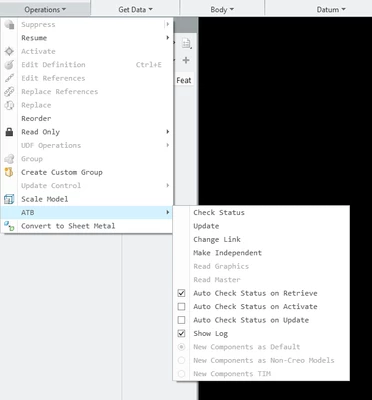
Anyway, maybe try the "Make Independent" function in this menu to break the link:

pausob_0-1759152891509.png

, or uncheck the "Auto Check Status on Retrieve" ?

2 replies

pausob19-TanzaniteAnswer
19-Tanzanite
September 29, 2025

Out of curiosity, how large are your files?  The numbers in brackets suggest 1GB of data!?

Anyway, maybe try the "Make Independent" function in this menu to break the link:

pausob_0-1759152891509.png

, or uncheck the "Auto Check Status on Retrieve" ?

21-Topaz I
September 29, 2025

Hi you are experiencing graphics slowdown with imported geometry.
How did you come to the conclusion that this related to the referenced model ?
What's the original file format and how big is it ?