


Question
Unpopulated table cells in Creo 2 Cabling drawings
In a cable harness drawing I want a table that details a connector with it's name and [model name], its pins, cooresponding wires attached to the pins, and the coresponding colors associated with the wires. See picture below.
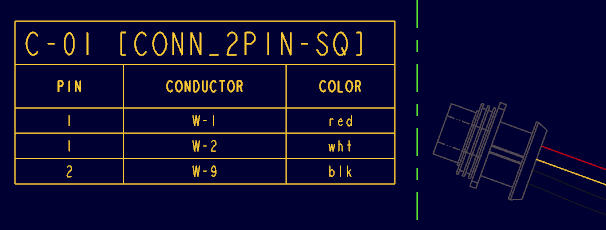
Commands:
Name: mbr.connprm.name
pin: mbr.connprm.pin.name
Conductor: mbr.connprm.pin.run.cond.name
Color: mbr.connprm.pin.run.cond.color
This I got from the Creo 2 tutorial class for Cabling, but it never works on any cable I create. Does it requires a certain parameter to be defined in order to link to the table properly? I can link it with other commands but once I use the connprm command it fails to populate 
This thread is inactive and closed by the PTC Community Management Team. If you would like to provide a reply and re-open this thread, please notify the moderator and reference the thread. You may also use "Start a topic" button to ask a new question. Please be sure to include what version of the PTC product you are using so another community member knowledgeable about your version may be able to assist.