


Dale_Rosema
23-Emerald III
23-Emerald III
March 22, 2013
Question

Updating Parameter - Confirm window pop up

  • March 22, 2013
  • 2 replies
  • 2872 views

When updating parameters in drawings (my specials), sometimes I have a confirmation window pop-up. After clicking Confirm, the change window pops-up. Other times the change window pops-up right away. This is crazY for muscle memory when your trying to rip these out as quick as possible. Sometimes you have to go for the mouse to click confirm while other times you don't.

What cause this window to pop-up?

Thanks, Dale
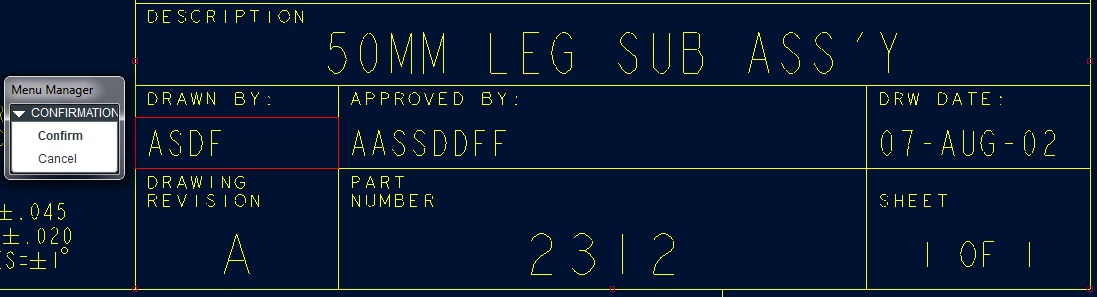
Parameter_change.jpg

Parameter_change2.jpg


This thread is inactive and closed by the PTC Community Management Team. If you would like to provide a reply and re-open this thread, please notify the moderator and reference the thread. You may also use "Start a topic" button to ask a new question. Please be sure to include what version of the PTC product you are using so another community member knowledgeable about your version may be able to assist.

2 replies

16-Pearl
March 22, 2013

Does this model has family table, by any chance? I had this issue couple of years ago, when doing drawings for one of the customers and it was mostly sheetmetal. IIRC, when I tried to edit parameter after creating a flat state (which in effect meant I had a family table for the part), there was this "Confirm" menu, and it didn't matter whether parameter was table-driven or not. It's a thing with upadting this parameter in all of the instances of generic part. If I had all parameters defined before creating the family table, nothing like this happened.

Dale_Rosema
23-Emerald III
23-Emerald III
March 27, 2013

Both the instances that have the pop up window and those that don't are models that are part of a differenct family tables. I didn't know if the parameters being locked had anything to do with this or not.

14-Alexandrite
March 27, 2013

If I am reading this correctly, this happens when you define a parameter in the format that is not in the drawing. It will then prompt you to fill in those parameters when you add the format to a drawing. I know there is a document out there for this but i can not seem to find it. I will link to it if i can.

Dale_Rosema
23-Emerald III
23-Emerald III
March 27, 2013

Sorry Andrew, but all parameters are defined. This happens when I go to modify a parameter.

When I do specials at this company, the revision level may go from F from the origianl to A for the special, the person who modeled is goes from one of two previous people to myself, and so on.

This happens when I double click on the cell in order to edit the value. Sometimes it pops up the confirmation window which either requires me to middle mouse button to select it, or to actually scroll over and click on confirm. Other times it pops up the box that I can directly enter text into. The problem arises from when I am flying through specials, sometimes is acts one way and sometimes the other. I am trying to find out why there is this behavior so that it can be constitent and I don't stumble on doing it one way when it's the other. It just slows me down to much.

Thanks, Dale

Dale_Rosema
23-Emerald III
23-Emerald III
June 20, 2014

I still have this happening and would like to know if somebody may know why sometimes a confirmation window pops up and sometimes it doesn't.

Is there something in the config.pro like:

confirm_on_edit that can be set on/off?

Thanks, Dale
