14-Alexandrite
October 29, 2020
Question

Viewing Plane Lines - How to Thicken?

  • October 29, 2020
  • 1 reply
  • 1982 views

Community,


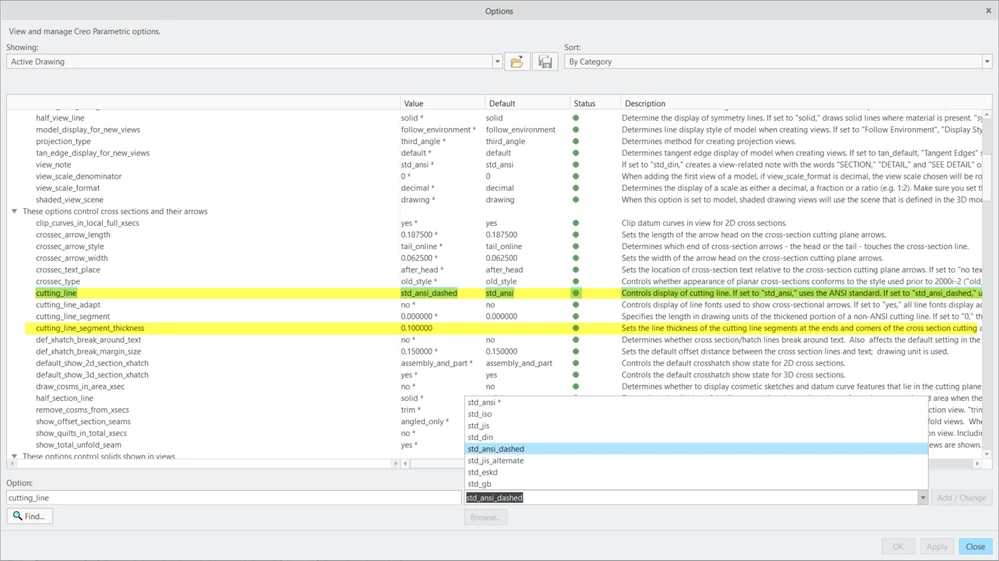
Is there a way to thicken the viewing plane lines in Creo 6?  The first snippet below is from ASME Y14.2, and I know that Creo can make the first two viewing plane lines, but I have not found a way to thicken them.  There is an option cutting_line_segment_thickness, but only for ends and corners, but I couldn't even get that to work.  Thanks in advance.



asme y14_2.pngdrawing options.png

1 reply

23-Emerald IV
October 29, 2020

Line thickness is usually handled by pen table files.  These also can apply to PDF output and publishing.


https://support.ptc.com/help/creo/creo_pma/r7.0/usascii/#page/fundamentals%2Ffundamentals%2Ffund_two_sub%2FTo_Change_Plotting_Pen_Attributes.html%23


ThoRig14-AlexandriteAuthor
14-Alexandrite
October 29, 2020

I only want to thicken the viewing plane lines, not all the lines on the drawing.