4-Participant
June 10, 2025
Solved

Volumenerzeugung Handauflagefläche Fahrradgriff

  • June 10, 2025
  • 1 reply
  • 2158 views

Hallo Community,

ich stehe derzeit vor einem Problem und ich komme wirklich nicht mehr weiter. Ich möchte einen ergonomischen Fahrradgriff für ein studentisches Projekt konstruieren, der am Ende mittels 3D-Druck gefertigt werden soll. Ich habe ein Teil der Auflagefläche herausextrudiert, um später ein weicheres Material (evtl. TPU) entweder über 2 Komponentendruck oder durch mechanisches Fügen in einem extra Schritt auf die Fläche aufzubringen. Die Schritte dafür waren Versatz --> Profil --> Zusammenführen --> Verbundvolumen (Bem.: Das Modell besitzt Freiformflächen). Für die Auflagefläche benötige ich wiederum das zuvor herausextrudierte Volumen, das ich dann ggf. auch anpassen kann. Ich bin zunächst gleich vorgegangen und am Ende wollte ich mit beim Verbundvolumen Material auffüllen, was zu einer Fehlermeldung führte. Dann habe ich jeweils die untere und obere Skizzengeometrie auf die Fläche durch Zusammenführen erstellt. Wie bekomme ich jetzt ein Volumen aus diesen Flächen? Oder gibt es einen anderen Ansatz, wie ich das Volume bekomme? Ich wäre euch sehr dankbar, wenn mir jemand dabei helfen könnte, dieses Volumen zu erstellen.


Vielen Dank im Voraus


Software: Creo Parametric 10.0 Student Edition

Best answer by kdirth

Looks like you are trying to cut out a section and replace it with a different material.


I would suggest, after removing material, copy all of the surfaces created by the cut (sides and bottom) in one feature then merging with the copy of the original surface.  This should create a fully enclosed volume that can be solidified as a new body.


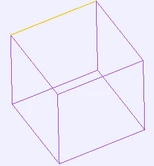
Another trick to use when working with surfaces is to change display style to wireframe.  In wireframe, the open edges will display in a different color (yellow).

kdirth_0-1749640786631.png


If your merge is leaving some open edges, try extending the side walls a little to ensure intersection with the top surface before merging.


1 reply

kdirth
21-Topaz I
21-Topaz I
June 10, 2025

If you can share the model, it would help us determine what is needed.


I would guess that you have not made a fully enclosed volume.  You may need to copy the top surface of your base structure and merge that with the sides and top.

There is always more to learn.
4-Participant
June 10, 2025

Hi kdirth,

thanks for your reply. I have attached the model. Navigate to Inlay in the modeltree. On the first step i have created an offset to get the negative volume of my inlay. And from that point i got problems to create a new body for the inlay. I tried a lot but I´ll be honest, i don´t know how to go on from that point. I hope that helps.

Thank you in advance

kdirth
21-Topaz I
21-Topaz I
June 10, 2025

You are using an educational version of Creo (I should have noted that since you said it is a student project).  Unfortunately, most of us here are using a commercial version and cannot open it.


You will need to provide more images, including the model tree, and description for us to understand your model.

There is always more to learn.