
1-Visitor
April 1, 2017
Question

Want to close the black line when doing the 3D section (Creo 2.0)

  • April 1, 2017
  • 4 replies
  • 1844 views

This problem happens on Creo 2.0 with ASUS ROG G551JM.

When I am doing the 3D section with shading with edges display style, black line will show up like below picture.

However, this problem doesn't happen on my desktop with the same software.

Anyone knows how to fix this problem? Thanks a lot!
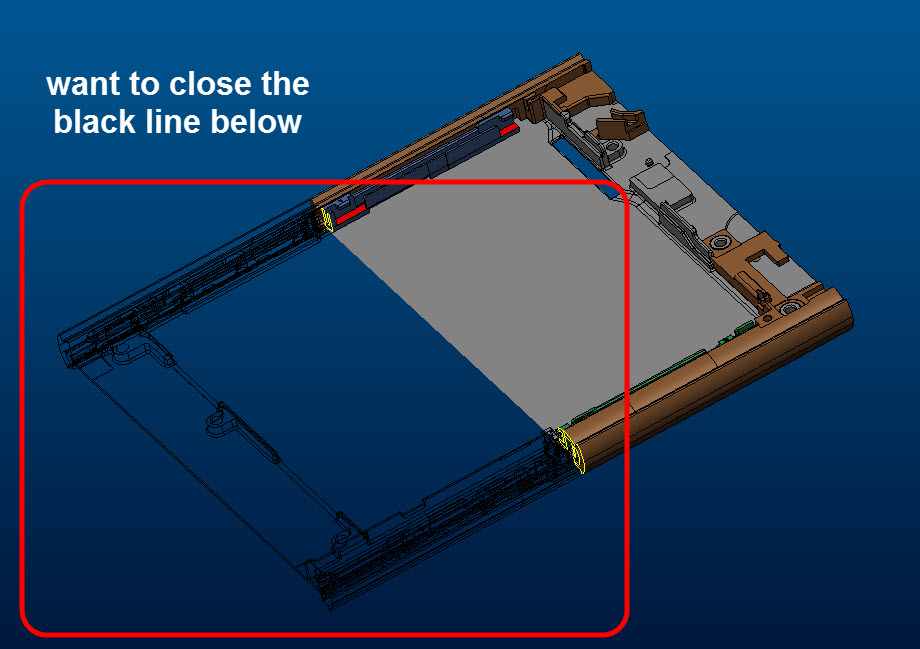
Pic.jpg

4 replies

18-Opal
April 3, 2017

Hello Hung,

Please take a look at the Platform Support page and make sure that the graphics card and driver version are listed as supported or certified.

In the By Product drop down select the release you are using, e.g. PTC Creo 3.0.

Thanks,

Amit

StephenW
23-Emerald III
April 3, 2017

Replacing video cards or hardware may not be an option.

You may want to try upgrading your graphics card drivers.

In addition, you can test to see if you have have graphics card issues by temporarily adding the following config.pro option

graphics win32_gdi

hchiayu1-VisitorAuthor
1-Visitor
May 9, 2017

Hi Stephen,

I tried to add graphics win32_gdi into config.pro, and the black lines truly disappeared.

It means that the problem was caused by graphic card indeed.

However, I still can't find any solution to deal with this problem...

It really drives me crazy!!

StephenW
23-Emerald III
May 9, 2017

If the win32gdi graphics option works, you can use permanently. It will reduce your video performance but if you models are not large, it may not be a problem.

Did you try updating your graphics card drivers? That sometimes solves issues.

Your only option may be to upgrade your video card. Make sure you get a workstation grade video card like an NVIDIA Quadro or check the ptc support for other certified graphics cards.

hchiayu1-VisitorAuthor
1-Visitor
May 9, 2017

My models are parts of mobile phone and the total assembly is large. win32gdi graphics may not be a good option for me.

I have also updated my graphics card (Nvidia GTX660), but still can't fix this problem.

Maybe I will try to contact PTC technical engineer for help. Truly thanks for your advice!