1-Visitor
May 15, 2015
Solved

Warp feature in creo

  • May 15, 2015
  • 7 replies
  • 5593 views

Hi Guys,


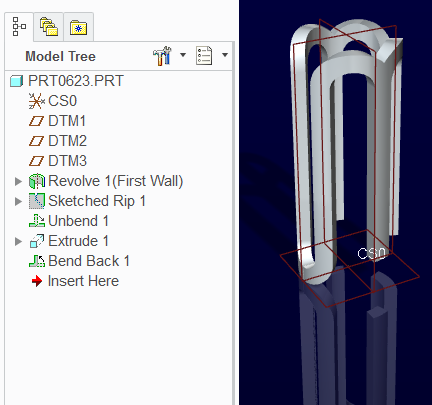
I want to bend the solid into a cylinder.So i use the warp feature in creo but I am not able to achieve the bend completely.

I am attaching the screenshots .Basically I would like the bend to be complete by ending where it started.

Thanks in advance.


This thread is inactive and closed by the PTC Community Management Team. If you would like to provide a reply and re-open this thread, please notify the moderator and reference the thread. You may also use "Start a topic" button to ask a new question. Please be sure to include what version of the PTC product you are using so another community member knowledgeable about your version may be able to assist.
Best answer by TomD.inPDX

Yep, you can

Creo 2.0 full version attached

Wrapped_metal.PNG

7 replies

1-Visitor
May 15, 2015

Have you tried a spinal bend feature?

14-Alexandrite
May 16, 2015

bend1.JPGbedn2.JPG

17-Peridot
May 16, 2015

Nice one, Matt.

What Matt is showing you is that the part if wrapped 360 degrees without overlap. The hook at the end of the OP's image requires >360 degrees of warp.

Warp can be a tough nut to crack. It is missing some important control features, and others are hidden. It is not ready to replace Spinal or Toroidal bends yet.

BTW, you can probably do this in sheetmetal as well.

17-Peridot
May 16, 2015

Yep, you can

Creo 2.0 full version attached

Wrapped_metal.PNG