

What does determine directions of dropped curves in the Style tool?
Hello. I model a car using the Style tool. I'm trying to make a rooftop but faced some problems. My way of creating the rooftop is to create two surfaces and make an intersect curve. After that, I use The Offset Tool to offset this intersect curve twice for each of the two surfaces. Thus, I create two curves on each surface and am able to trim these two surfaces and create a blend between them. Here's a picture to make it clear for you.
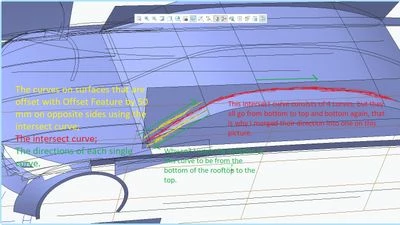
As you can see, for some reason the lower offset curve has a direction (from the top to the bottom) that doesn't match the direction of the offset curve higher(from the bottom to the top). I know that I can convert curves and flip their directions, but how to fix this issue without converting? Maybe I have some problems with the datum planes and references of my curves to them? Thank You in advance.
