1-Visitor
May 20, 2024
Solved

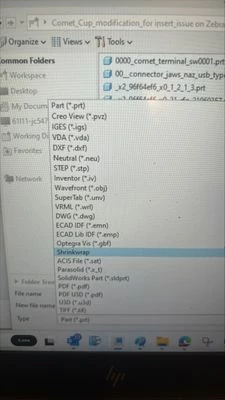
When I want to save as stl file it dose not appear in the option list.

  • May 20, 2024
  • 2 replies
  • 2914 views

Hi there, I used Creo Parametric Version 9.0.3.0.  I don't have stl option when I click "save as". Dose anyone have this same issue? Thank you in advance for your help!

JC_11033391_0-1716231711825.jpeg


Best answer by tbraxton

As I suspected, no solid geometry. You are not able to export to STL from Creo without solid geometry in the model. Check with a solid part and you will see the STL option. If you see it with a solid part, then it is not a licensing issue.


I have never seen any license of Pro/E or Creo Parametric that did not support export of STL format.

2 replies

tbraxton
22-Sapphire II
22-Sapphire II
May 20, 2024

Are you certain that when you are attempting to save as the active model has solid geometry in it? Check that and report back here.

Dale_Rosema
23-Emerald III
23-Emerald III
May 20, 2024

You also don't have 

-CGM (*.cgm)

-Render (*.slp)

-EDMD (*.idx)

-Medusa (*.asc)

23-Emerald III
May 20, 2024

That option will depend on what level of licensing you have, I think.

It does appear in my Design Advanced license and I will venture it will be in the Design Advanced Pro. too.


1-Visitor
May 20, 2024

Thank you!
