
12-Amethyst
June 7, 2025
Question

Where is the Explode > Reset?

  • June 7, 2025
  • 4 replies
  • 1877 views

I opened this Topic a little while ago, and accepted what seemed to be a solution, but it is only a band-aid, not a full solution.  It does not always work.  Since that topic is "Solved" I am opening this as a follow up.


The previous topic is: "Where is the Explode > Reset Component Position Function?"  located at https://community.ptc.com/t5/3D-Part-Assembly-Design/Where-is-the-Explode-gt-Reset-Component-Position-Function/m-p/1017403


The Toggle Explode is misleading as I mentioned in a response on the other thread.  Now, here is an example where the Toggle does not place components back to the original location like the "Explode > Reset" did.  This is as close as I can get.  If I Toggle explode on any of these, it sends them out into space.
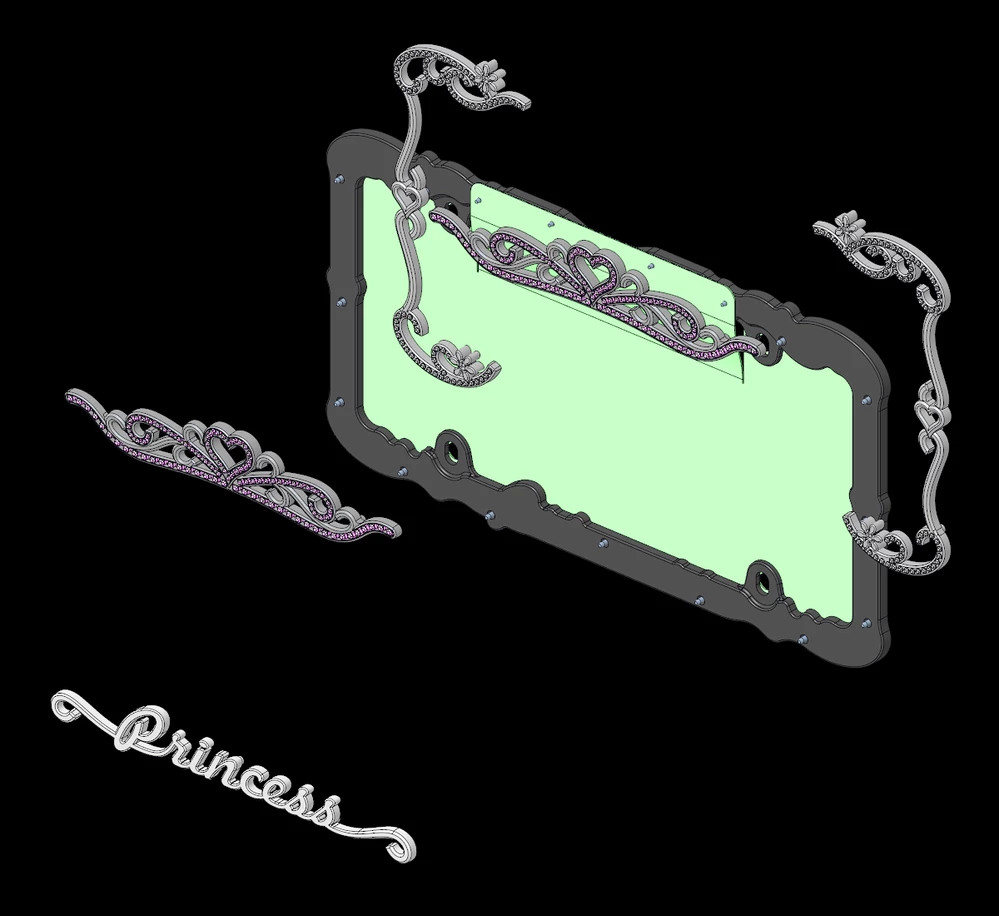
 

Creo-Fail-Explode-Reset.png


Where is the Explode > Reset Position function?


In case you don't know, there was an excellent function for working with explode states called "Reset" which would put the component back to the original place in space, relative to the assembly or subassembly it was in.  If you were manipulating a position, then decided you did not like how things were looking, you simply reset the position - like an undo for all the moves of that particular component or subassembly.


The above model is an example where the "Toggle" fails to achieve what the "Reset" did.  I say "DID" and "WAS" because it appears (from the previous thread and from PTC tech support) the functionality has been removed.  It is possible that PTC has hidden it so well that we can't find it.  I am hoping that one of you smarter people can show me where it is.  Creo 9.0.9.0


Additionally, I don't see how to work with the "Explode State" to see what Creo thinks is exploded or not.  With multiple levels of assemblies and subassemblies it is ridiculous to try to figure it out.  Again, that used to be a simple function in an interactive table making it easy to know exactly what was happening in the model.  Where did that function go?


Please tell me where the "Explode > Reset Position" functionality went.  Thank you.

4 replies

ByDesign12-AmethystAuthor
12-Amethyst
June 7, 2025

I forgot to ask an important question in the above.  How do you reuse an explode state of a subassembly in the parent assembly explode?

For instance, the decorative piece with all the purplish crystals is a subassembly that has its own explode state.  How do I have that subassembly explode state be part of this top level explode?

Again, that was basic functionality, but I can't find it in Creo.  Thanks for your help.

24-Ruby III
June 8, 2025

Hi,

I suggest you to discuss current Creo Explode functionality directly with PTC Support.

13-Aquamarine
June 9, 2025

Doesn't Copy Position accomplish the same thing?

aputman_0-1749477589367.png


ByDesign12-AmethystAuthor
12-Amethyst
June 9, 2025

Thank you for the responses. Yes, Copy Position is a hack to make it look right - just like starting all over with a new explode state eventually gets there. Yet, both approaches create more work - in the model, and in the drawing - with note and balloon reassignments, fiddling with all the Cosmetic Offset Lines, etc..


This assembly was beautiful in a previous version. It pulls up looking great in Creo 9, but one little customer requested change, and the whole thing blows up. (That's another SPR that PTC is dragging their feet on.)


As for fixing several assemblies like above (since the software fails to operate as PTC claims), I am looking for the tools that (in past versions) were very straightforward and easy. PTC has removed and/or hidden a lot of great functionality, so if you know where they put it, please share. The User Interface totally fails the intuitive test - so much so that Tech support can't figure it out either.

12-Amethyst
June 9, 2025

I used the "Edit Position" and then the "Toggle Exploded State" button. (Creo 7.0.9.0)


ArnoldCollett_1-1749487303165.png


ArnoldCollett_0-1749487269820.png


Community Moderator
June 13, 2025

Hello @ByDesign


It looks like you have some responses from some community members. If any of these replies helped you solve your question please mark the appropriate reply as the Accepted Solution. 

Of course, if you have more to share on your issue, please let the Community know so other community members can continue to help you.

Thanks,
Vivek N.
Community Moderation Team.

ByDesign12-AmethystAuthor
12-Amethyst
June 13, 2025

@vnamboodheri  - what if there is not an acceptable solution given?

I fear PTC has botched up the software sufficient that neither Tech Support or the Community can find a fix.  Unfortunately the rest of PTC is too ashamed of the product, so they have hidden themselves from any way to connect.  I would really like to know what happened to this important functionality.  Is it hidden so well that no one can find it?  Or, did they delete it?

20-Turquoise
June 13, 2025

@ByDesign wrote:

Please tell me where the "Explode > Reset Position" functionality went.  Thank you.


In Pro/ENGINEER® 2001  it was still called Reset...

See page 16 of the Pro/PROCESS for Assemblies Topic Collection pdf: aspro.pdf

kdirth
21-Topaz I
21-Topaz I
June 13, 2025

Here is an Idea that I started over a year ago:  Add a button to remove the explode state from a se... - PTC Community


Until it is implemented, copy position is your best bet to quickly move it to the same position as another part/subassembly

kdirth_0-1749841508990.png

There is always more to learn.