12-Amethyst
February 13, 2023
Solved

Where is this Surface Copy Command?

  • February 13, 2023
  • 11 replies
  • 4353 views

I use this functionality often, but I can't find how to get to it.  OK, that sounds funny, but I access it with a very old mapkey that enacts the old cascading menus.  How do you access this using Creo 9 menus?
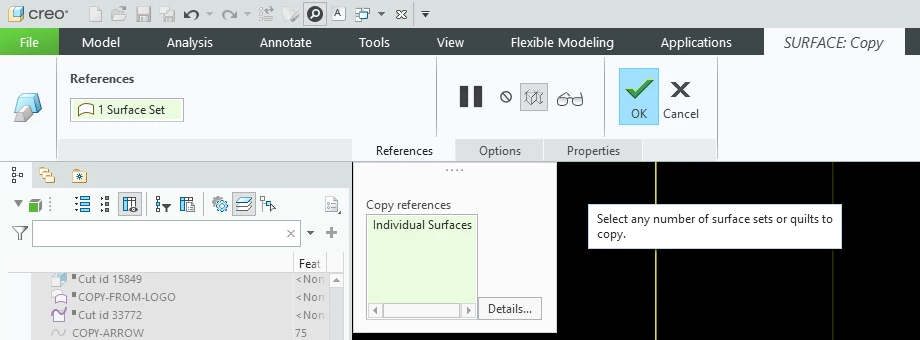
 

Surface-Copy-Menus.png


As a secondary question, how do you access the cascading menus without an old mapkey?



Best answer by tbraxton

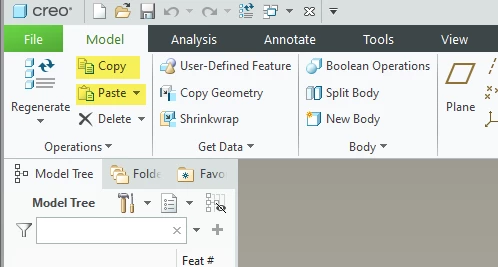
In the model tab you can activate copy and paste directly with LMB but you must have an object (i.e. surface) selected before the commands are activated in the GUI. See pic below. This is functionally equivalent to use of the key shortcuts.


The copied entity is dependent on the parent object when using this functionality, so it is controlled by the reference.


If you will explain in detail the design intent you are need, there may be some alternate options.


tbraxton_0-1676333342007.png


11 replies

tbraxton
22-Sapphire II
February 13, 2023

To get to this in the UI:

Select the surface(s) (or quilt) that you want to copy. Use CTRL+C then CTRL+V to execute a copy paste. This follows the object->action paradigm.


The only other way to access obsolete menu manager UI elements I am aware of would be to use one of the APIs (Toolkit) to get to some of the old menu manager functionality.

ByDesign12-AmethystAuthor
12-Amethyst
February 13, 2023

I appreciate the answer.  That does bring up the menu.  Thank you.  Do you know how to bring it up without the double action of CTRL+C then CTRL+V?  The old mapkey does it, so it's part of the functionality.  How do we get to it?  I suppose it might be another hidden - "you have to know it because they don't tell you" thing?


Without a lot of experimentation, this appears to be the same as "Copy" on the Model ribbon.  I didn't try that because I don't want the classic Ctrl-C Copy.  If you copy-paste something in any other program, it makes a completely independent copy.  That might be useful, but I don't want that here.  This is (I hope) a parametric reference - meaning it will update and follow the original.  That is NOT the classic copy-paste.  Oh well.  I should not be surprised by yet another bent paradigm.


I sure wish PTC would decide which paradigm to follow.  I am so frustrated trying to figure out what is explicit, what is hidden functions, what is action > object, what is object > action — and why it does not give feedback!  Worst of all, they don't give a good way to find it -- command search certainly doesn't work very well.  Help search is almost useless, unless you know exactly the right keyword.  Sorry for blowing off steam.

tbraxton
tbraxton22-Sapphire IIAnswer
22-Sapphire II
February 14, 2023

In the model tab you can activate copy and paste directly with LMB but you must have an object (i.e. surface) selected before the commands are activated in the GUI. See pic below. This is functionally equivalent to use of the key shortcuts.


The copied entity is dependent on the parent object when using this functionality, so it is controlled by the reference.


If you will explain in detail the design intent you are need, there may be some alternate options.


tbraxton_0-1676333342007.png