
10-Marble
July 8, 2020
Question

Why Creo is showing only two options for Chamfer? OXO and O1XO2 ? Not showing Angle x D

  • July 8, 2020
  • 3 replies
  • 1612 views

Hi All,


Its strange that I am trying to apply a chamfer on one corner i.e. in the form of Angle x D. But creo is showing me only two options i.e. OXO and O1XO2. Please see below screenshot.chamfer..JPG
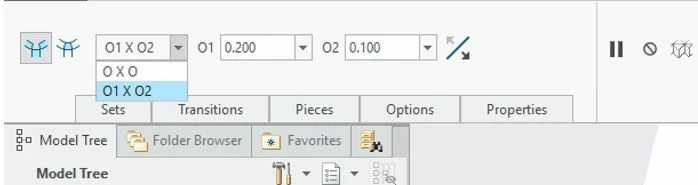
Can anyone, please explain the root cause of it.? I want Angle X D as well Thank you in Advance.

3 replies

24-Ruby III
July 8, 2020

@hvyas-3 wrote:

Hi All,


Its strange that I am trying to apply a chamfer on one corner i.e. in the form of Angle x D. But creo is showing me only two options i.e. OXO and O1XO2. Please see below screenshot.chamfer..JPG

Can anyone, please explain the root cause of it.? I want Angle X D as well Thank you in Advance.


Hi,

I guess that root cause of it is your model's geometry.

16-Pearl
July 8, 2020

Hi, 


The options that are available in the chamfer tool menu are dependent upon the geometry you have selected. As far as I can tell (minimal testing), the "AnglexD" option is only available if you select an edge. Do you have surfaces selected?


Ty

Mahesh_Sharma
22-Sapphire I
July 8, 2020

@hvyas-3 


The type of DxD,D1xD2, AnglexD and 45xD are available for edges of two flat surfaces only. For your data, the chamfer references might not matching with this condition.