14-Alexandrite
March 7, 2022
Question

Why do my layers get messed up when creating STEP files?

  • March 7, 2022
  • 3 replies
  • 2124 views

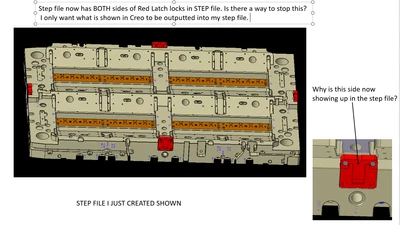
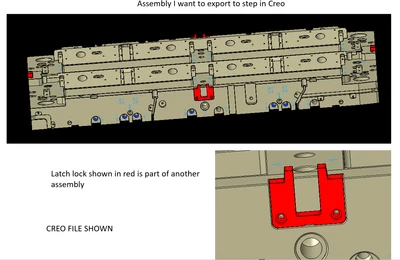
Hi guys, when I want to Export a STEP file of ONLY what is shown on my screen, I always get some assemblies that show up that should not. Like the layers get messed up.


See pics below.


How can I fix this so ONLY what is currently shown on my screen is exported out to STEP?


Thanks for the help.


Jay


dunebuggyjay_2-1646666020040.png


dunebuggyjay_3-1646666038813.png


dunebuggyjay_5-1646666177599.png


3 replies

13-Aquamarine
March 7, 2022

The most consistent success I have had is by using simplified reps.  Using layers and Hidden mode always gave me problems.

19-Tanzanite
March 7, 2022

Perhaps the latch solid model also has the other side of the latch included as a surface?

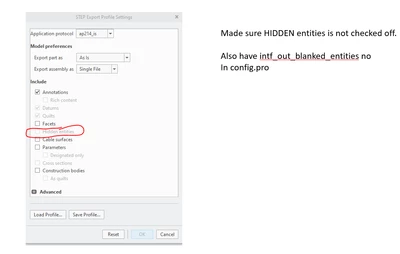
In the export settings, try unchecking "Annotations" and then "quilts" and then export the STEP file...

14-Alexandrite
March 7, 2022

Unfortunately I tried that, I get the same result. 

Putting them on simplified reps like mentioned above works, but its a ton of work on large assemblies. 


It only seems to happen (as far as i can see)  on assemblies inside of assemblies. 

24-Ruby III
March 8, 2022

Hi,

maybe latch lock is included in more than one layer and these layers are "conflicting" -OR- latch lock is not included in any layer ?

14-Alexandrite
March 8, 2022

No conflicting layers. I am willing to bet its because its an assembly inside of an assembly.


I have submitted this with files and video to PTC, and they told me they can repeat this problem on their end.


This has been a problem for many years...and I usually just try and work around it. But figured i should see what the official explanation is as to why this happens. 


When I hear something back from them, ill update this post.