
15-Moonstone
March 17, 2022
Solved

Why does CREO allow a sketched boundary line shown in created PDF but invisible in CREO drawing?
  • March 17, 2022
  • 10 replies
  • 5171 views


JS_9824412_1-1647525285070.png

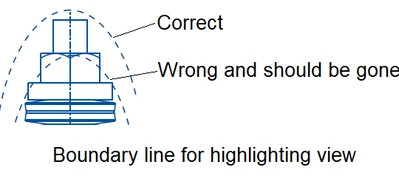
In an assembly drawing, I used a sketched ellipse to highlight a region of assembly. In PDF file, however, there showed up two ellipses. The PDF was/is not acceptable. However, no one knew/know how to get rid of the extra ellipse. 


Weeks have passed before I finally figured out just now that CREO allows a sketch ellipse to be invisible in CREO drawing environment however become visible in PDF. The extra ellipse was indeed a sketch with invisible feature. 


Just now I accidently picked up the invisible feature and moved it outside the drawing border, and played with it. and all of a sudden, it couldn't take my teases any more and showed up. What a fun!


But what is the point that CREO allows an invisible Ellipse to be created in a drawing? I cannot see any benefit of it except for the frustrations and time-wasting debugging at end user side to try to figure out why some extra features showed up in PDF yet are not there in CREO drawing environment.


Any idea how to benefit from an invisible feature? I want to learn more.

Best answer by sacquarone

Hello @JS_9824412 


We have no valid explanation justifying why ellipse is invisible in initial conditions, because:

  • Not in an hidden layer
  • Not erased
  • Presence not driven by Drawing Program
  • No case reported to us in our Knowledge Base in this direction so far (unless I messed anything)


So, as @MartinHanak said, the easiest way to proceed in similar situation is to delete the "invisible draft entity". For this purpose, instead of random graphical clicks (which is painful and far from being easy), this may help to:

  1. Identify it with Search Tool, which esiaer the selection for delete action purpose later (see movie 1)
  2. Or select the boundaries after access to Sketch tab of the drawing and resize it (see Movie 2, and observe after resize that Ellipse is now visible, which is now expected, and furthermore an evidence that original "invisible" display status was somehow a kind of corrupted display ***).

*** Regarding this corrupted display:

  • if it's an isolated use case, I would suggest to consider one of the 2 approaches in the movie as a resolution
  • Otherwise, if impact is larger, we would suggest opening a case to PTC Techincal SUpport for further assistance (we will need if so different drawings appended as attachment hilighting this kind of unexpected behavior, and ideally a reproducible way to start from a "visible" of a Draft Item, and leading after to an "invisible" display status)


Regards,


Serge

10 replies

24-Ruby III
March 17, 2022

@JS_9824412 wrote:


JS_9824412_1-1647525285070.png

In an assembly drawing, I used a sketched ellipse to highlight a region of assembly. In PDF file, however, there showed up two ellipses. The PDF was/is not acceptable. However, no one knew/know how to get rid of the extra ellipse. 


Weeks have passed before I finally figured out just now that CREO allows a sketch ellipse to be invisible in CREO drawing environment however become visible in PDF. The extra ellipse was indeed a sketch with invisible feature. 


Just now I accidently picked up the invisible feature and moved it outside the drawing border, and played with it. and all of a sudden, it couldn't take my teases any more and showed up. What a fun!


But what is the point that CREO allows an invisible Ellipse to be created in a drawing? I cannot see any benefit of it except for the frustrations and time-wasting debugging at end user side to try to figure out why some extra features showed up in PDF yet are not there in CREO drawing environment.


Any idea how to benefit from an invisible feature? I want to learn more.


Hi,

please upload some Creo files for testing purposes.

15-Moonstone
March 17, 2022

I have made the correction already. ... Yeah I haven't uploaded it into server.. I can open a new workspace and load in the one in server. I am trying now. Stay tune.

24-Ruby III
March 17, 2022

@JS_9824412 wrote:

I have made the correction already. ... Yeah I haven't uploaded it into server.. I can open a new workspace and load in the one in server. I am trying now. Stay tune.


Suggestion: Pack all files into zip file and upload this zip file.