
1-Visitor
January 26, 2017
Question

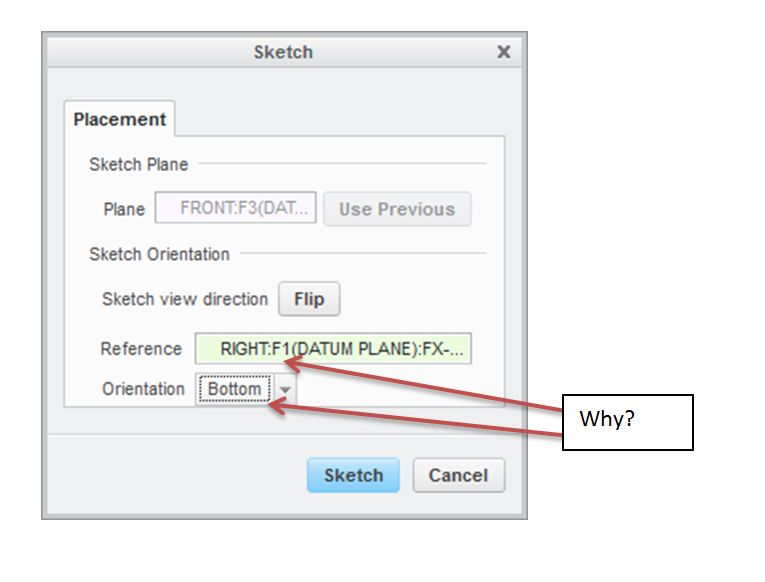
why is the placement reference orientation always wrong

  • January 26, 2017
  • 2 replies
  • 1586 views

When I start a sketch in Creo (now 3), the orientation is very often different from what I want. I would like the orientation of the sketch to correspond to the orientation of the basic planes of my model, but Creo decides otherwise. Why is that? Is there a way to have the reference and orientation align? (top = top, right = right, front = front)
 

Clipboard01.jpg

2 replies

18-Opal
January 26, 2017

Hi BJ,

I just tested in Creo 3.0 and when I created a new sketch, if I select FRONT as the Sketch Plane, the default Reference Plane and Orientation are RIGHT & RIGHT.  If select TOP as the Sketch Plane, the Reference Plane and Orientation are RIGHT and RIGHT.  Finally, if the Sketch Plane is RIGHT, the Reference Plane and Orientation are TOP and LEFT.

I am not sure why it's defaulting to RIGHT and BOTTOM for you.

Is this happening for any other user or on any other machine?

Thanks,

Amit

1-Visitor
January 26, 2017

My understanding is that it picks the same reference but the orientation depends on how your model is oriented in the graphics window.