
4-Participant
December 31, 2025
Solved

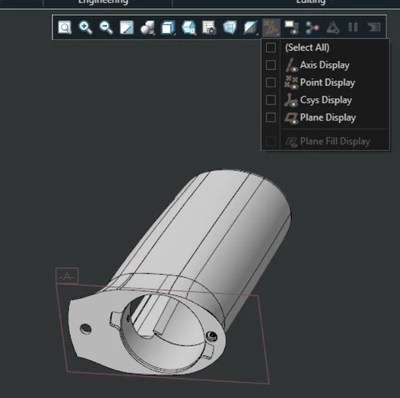
Why some planes do not hide even though you've disabled plane display.
  • December 31, 2025
  • 1 reply
  • 191 views

AK_10981268_0-1767200674458.png

As can be seen in above screenshot, even though the "Plane Display" is turned off this plane is still visible. This is part from an assembly that I received from a colleague, and for that whole assembly as well when unticking everything in that dialogue box some planes are still visible.


I'm using Creo 9

Best answer by pausob

Looks like a "set datum plane" from a legacy model.  I believe that such planes need to be put on a hidden layer to hide them, or in Creo 8 and above, you can set a configuration option:

hide_set_datum_plane_with_plane to yes so as to be able to use the plane display view toggle to hide them.


See this video

or this thread

for more info.

1 reply

pausob19-TanzaniteAnswer
19-Tanzanite
December 31, 2025

Looks like a "set datum plane" from a legacy model.  I believe that such planes need to be put on a hidden layer to hide them, or in Creo 8 and above, you can set a configuration option:

hide_set_datum_plane_with_plane to yes so as to be able to use the plane display view toggle to hide them.


See this video

or this thread

for more info.