
1-Visitor
July 20, 2020
Question

why user customize parameter did not show in drawing table?

  • July 20, 2020
  • 2 replies
  • 2348 views

I set few parameter in the part. but it fail to show in my drawing. if i use "note" key in my customize parameter , it able to show. but it just can not show in table. 
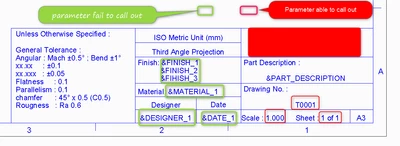
 

Nee_0-1595212354474.png 

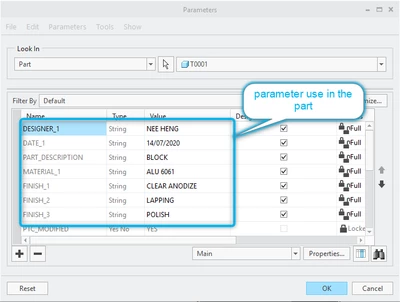
Nee_1-1595212368481.png

possible to advise , how to solve this problem. 


2 replies

24-Ruby III
July 20, 2020

@Nee wrote:

I set few parameter in the part. but it fail to show in my drawing. if i use "note" key in my customize parameter , it able to show. but it just can not show in table. 
 

Nee_0-1595212354474.png 

Nee_1-1595212368481.png

possible to advise , how to solve this problem. 


Hi,

1.] basic rule ... parameter callout must be included in table cell

2.] if you upload your part+drawing I can investigate them

3.] to upload Creo files, pack them into single zip file and upload this zip file

Nee1-VisitorAuthor
1-Visitor
July 21, 2020

Hi Martin,

please refer to my attach zip file. 

I already don't have the actual format which i show in my first message. due to i keep try and error difference way. but the result was same. i did uninstall and install back the software. but still get the same result. how the attach file you can help me spot the problem for me. 


24-Ruby III
July 21, 2020

@Nee wrote:

Hi Martin,

please refer to my attach zip file. 

I already don't have the actual format which i show in my first message. due to i keep try and error difference way. but the result was same. i did uninstall and install back the software. but still get the same result. how the attach file you can help me spot the problem for me. 


Hi,

1.]

I opened matte_solid.prt, added some geometry and modified user parameter values. In your original model all user string parameters does not contain any value, they are empty !

2.]

I created drw0001.drw using matte_solid.prt and a3_drawing.frm. Everything is OK - see picture and uploaded zip file.

drw0001.drw.png

3.]

I hope you know that when format (.frm) is added to a drawing (.drw) then Creo copies all tables from the format into the drawing. All other items available in the format are linked to the drawing.

15-Moonstone
July 20, 2020

If you want the model parameter to be used then you need to have the parameter name followed by :mdl so make sure that the table cell in the format is &FINISH_1:MDL for instance. If you don't do that then it defaults to using a parameter from the drawing.

Nee1-VisitorAuthor
1-Visitor
July 21, 2020

Hi,


i did try your method, but still the same.