
12-Amethyst
February 23, 2021
Question

Window order

  • February 23, 2021
  • 1 reply
  • 2401 views

Hi Guys,


is there a way to change the order of windows in the drop-down menu to activate a Creo-window?
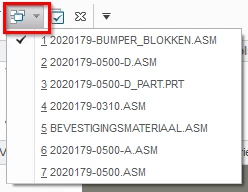
 

gdaenen_0-1614085822589.png


I quite often have a part or assemby active and when I close the window of this part or assy, Creo opens the part or assembly which is the last one in the list.
It would be better if creo will activate the window which was activated before I activated the window which I closed.

This means that Creo needs to change the order in the list, each time you activate a specific window.

1 reply

16-Pearl
February 24, 2021

Hi gdaenen,


I think that  Config.pro option activate_window_automatically is what you are looking for.


best whishes.

12-Amethyst
February 25, 2021

Hi Trebla,

if I read the article from PTC, I think this is the config setting I was looking for. But I played with it and it's not working like it should be.

If I put " activate_window_automatically yes " in the config (like it was because this is the default setting), and I close the window. You can see that the last active window shows up for half a second (or less) and then the last window in the list will be activated again.

If I put " activate_window_automatically no " in the config, the last window in the list will be immediately activated. So the only difference is the step of showing the last active window for a split second on my screen. So this won't help, it only slows it down. And maybe it does something else too, what I don't see yet...

kdirth
21-Topaz I
February 25, 2021

I believe this config setting allows you to click in a model window to activate it, eliminating the need to select the the Activate button, press Ctrl+A, or select the window from the drop down menu.  It also allows you to select and activate the window from the task bar.  It has nothing to do with window order.

There is always more to learn.