10-Marble
November 4, 2024
Solved

Wrong Volume Calculation

  • November 4, 2024
  • 4 replies
  • 2300 views

Hello,


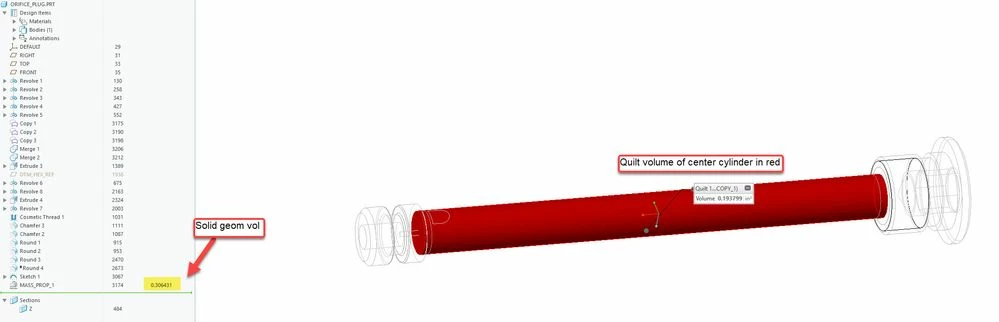
I am using Creo Parametric 9.0.8.0 with Windows 10. I have an odd case where it appears that Creo is measuring the volume of a part wrong. The volume output from the mass properties dialog box is showing a value of about 0.306 in^3 as shown in one of the screen shots. However, this way underestimates the volume of the part. Just the main portion in the middle can be hand calculated to about 0.7 in^3. I don't know what is wrong here. I have tried regenerating the part and swapping to fully assigned properties and then back to geometry defined, but the number does not change. Any insight is appreciated.


Thanks,

 

Best answer by tbraxton

The calcs look reasonable to me with a cursory check of the geometry. Are you certain your manual estimate of volume is accurate?


Your model is using relative accuracy (not an issue in this context). You should not be creating/using models with relative accuracy in Creo 7+. If you are using legacy start parts you should immediately change them to absolute accuracy.


volume.jpg


4 replies

tbraxton
22-Sapphire II
22-Sapphire II
November 4, 2024

Post the model for evaluation. There are many things that could cause the results to be unexpected as you show in the screen shots. It is unlikely that Creo is in error here. It is most likely that Creo is reporting what the user has requested.

JohnDHage10-MarbleAuthor
10-Marble
November 4, 2024

Hi,


Here is the part file.


Thanks,


kdirth
21-Topaz I
21-Topaz I
November 4, 2024

Looks reasonable to me.  I also modeled to print with revolve with similar results - 0.336.

My simple calculation:

kdirth_0-1730749951668.png


There is always more to learn.
23-Emerald III
November 4, 2024

I get a .3385 volume in Creo 9.0.9 without the internal cuts.

tbraxton
22-Sapphire II
tbraxton22-Sapphire IIAnswer
22-Sapphire II
November 4, 2024

The calcs look reasonable to me with a cursory check of the geometry. Are you certain your manual estimate of volume is accurate?


Your model is using relative accuracy (not an issue in this context). You should not be creating/using models with relative accuracy in Creo 7+. If you are using legacy start parts you should immediately change them to absolute accuracy.


volume.jpg


JohnDHage10-MarbleAuthor
10-Marble
November 4, 2024

How do you update to absolute accuracy?


Thanks,


23-Emerald III
November 4, 2024

In Creo, File-Prepare-Model Properties

Third item from top of the window is Accuracy.