
1-Visitor
February 26, 2018
Solved

Creo 3.0 M140 - Reverse Mouse Wheel Not Working

  • February 26, 2018
  • 1 reply
  • 3371 views


Creo 3.0 M140 - Reverse Mouse Wheel Not Working (Win 10)


My mouse wheel works like this:

Roll the Top of Mouse Wheel Towards the Front of the Mouse -> Zoom OUT

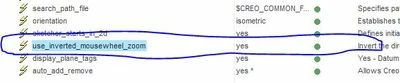
I have added the use_inverted_mousewheel_zoom  Yes to my CONFIG.PRO
 

Mouse2.JPG


No matter if the setting is Yes or No the mouse wheel zoom
function is exactly the same.

I want the mouse wheel to Zoom In when the mouse wheel is rolled
towards the front of the mouse.


Any suggestions?

Best answer by MartinHanak

Hi,


I tested use_inverted_mousewheel_zoom  YES  in CR3 M110 and M150. It works well in both versions.


IMPORTANT: You have to put the option into config.pro and restart Creo !

1 reply

24-Ruby III
February 27, 2018

Hi,


I tested use_inverted_mousewheel_zoom  YES  in CR3 M110 and M150. It works well in both versions.


IMPORTANT: You have to put the option into config.pro and restart Creo !

1-Visitor
February 27, 2018

I did have it saved into my CONFIG.PRO file...


I feel stupid but I did not know that you had to restart Creo. 😕

I restarted and it IS working now.


None of the posts regarding reversing the mouse wheel mentioned restarting Creo...


THAT was the missing piece to my puzzle!


Thank you!!

Dale_Rosema
23-Emerald III
23-Emerald III
February 27, 2018

Please mark Martin's answer as correct for those who may search on this topic so they know that you found a solution.