1-Visitor
July 3, 2022
Solved

Creo 9.0 models cannot be imported into ANSYS Workbench 2022.

  • July 3, 2022
  • 2 replies
  • 4811 views

1.png


In Creo 9.0, click the workbench option


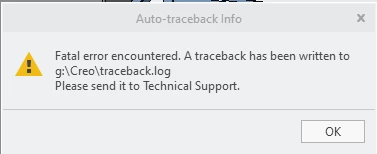
3.png

When the above picture appears, click "OK", Creo 9.0 will crash directly.

What is the reason for this, and is there a solution?

thanks!

Best answer by remy

Hi when opening a Creo 9 file and switching to ANSYS Workbench, Creo crashes. This is unexpected and you request assistance on Creo's support desk. Which is legitimate. 


There is a thin line that we need to draw: does the issue lay on the Creo Parametric or the Workbench side? From your screencapture the tab Workbench button is part of is that of Ansys <version here>.


Because the adapter / plugin is developed by ANSYS albeit PTC provides the API, a case needs to be filed at ANSYS Support Desk to determine the root cause of the crash.


Randomly i would recommend to re-install the CAD Interface via the ANSYS CAD Configuration Manager. 


///Edit:


After discussing the issue internally, i've been told that there has been instances of issues with overlapping surfaces or interferences between assembly components and that the plug-in could be challenged by welds

You can proceed by elimination and see if one or several of those features are causing the crash.

But again, this is poking randomly and ANSYS are the better qualified to identify the issue.


On a slightly different note, did you give a chance to  Creo ANSYS Simulation under the Application tab? The solution is more recent and more integrated, it is co-development whereas the Workbench plug-in is ANSYS IP.  


2 replies

23-Emerald III
July 3, 2022

My first guess is compatibility. Was Ansys 2022 was released before Creo 9?

Check on the Ansys or Creo web pages for a software compatibility matrix.

xliu-41-VisitorAuthor
1-Visitor
July 4, 2022

It also fails to import in Ansys 2022 R2, the same crash problem occurs.

remy21-Topaz IAnswer
21-Topaz I
July 4, 2022

Hi when opening a Creo 9 file and switching to ANSYS Workbench, Creo crashes. This is unexpected and you request assistance on Creo's support desk. Which is legitimate. 


There is a thin line that we need to draw: does the issue lay on the Creo Parametric or the Workbench side? From your screencapture the tab Workbench button is part of is that of Ansys <version here>.


Because the adapter / plugin is developed by ANSYS albeit PTC provides the API, a case needs to be filed at ANSYS Support Desk to determine the root cause of the crash.


Randomly i would recommend to re-install the CAD Interface via the ANSYS CAD Configuration Manager. 


///Edit:


After discussing the issue internally, i've been told that there has been instances of issues with overlapping surfaces or interferences between assembly components and that the plug-in could be challenged by welds

You can proceed by elimination and see if one or several of those features are causing the crash.

But again, this is poking randomly and ANSYS are the better qualified to identify the issue.


On a slightly different note, did you give a chance to  Creo ANSYS Simulation under the Application tab? The solution is more recent and more integrated, it is co-development whereas the Workbench plug-in is ANSYS IP.