
14-Alexandrite
March 23, 2023
Solved

Creo mecanism angular motor are greyed out

  • March 23, 2023
  • 1 reply
  • 2300 views

Hello,


I try to to analyse gears using the mecanism application in creo 7.0.5.0.

When i creating angular motor, this one is greyed out in the mecanism tree:
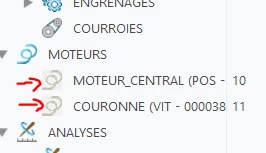
ArnaudGOELZER_0-1679584610963.png

As the consequence, motor can't be used in the analysis :
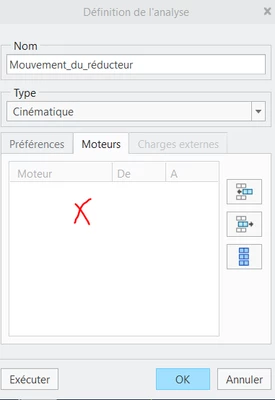
ArnaudGOELZER_1-1679584699300.png

(However when i create linear motor, this one can be retrieve in the analysis definition)

Does the problem come from a license that we don't have for angular motors ?


Regards,

Arnaud


Best answer by SweetPeasHub

I don't think it is a license issue.  It is hard to tell what is going on.  Can you show screenshots of your linear and angular motor definitions with their profile setup? If it is a complex model maybe try a simple model with one pin joint and no gears to confirm that you can make an angular servo motor work.

1 reply

17-Peridot
March 23, 2023

I don't think it is a license issue.  It is hard to tell what is going on.  Can you show screenshots of your linear and angular motor definitions with their profile setup? If it is a complex model maybe try a simple model with one pin joint and no gears to confirm that you can make an angular servo motor work.

14-Alexandrite
March 27, 2023

Hello,
thank you for your answer which allowed me to go further in the investigation and the trick to simplify the mechanism.

After redoing motor settings a few times, in different ways, I found where the problem came from. In fact I didn't use the "connection" between my frame and my part to be rotated.
As can be seen from the screenshots the wrong way (axis+surface+plan) :

ArnaudGOELZER_0-1679922875890.png


and the correct one by selecting the "connection_11" :

ArnaudGOELZER_1-1679922969603.png


this as an effect of being able to select the motor in the analysis

ArnaudGOELZER_2-1679924483223.jpeg


Thank you so much.
Arnaud

17-Peridot
March 27, 2023

Good to hear. I also have another little tip regarding "connection_11"  The connection can be named when it is created and makes the mechanism much clearer.


SweetPeasHub_0-1679927096810.png

SweetPeasHub_1-1679927143016.png


SweetPeasHub_2-1679927203421.png