4-Participant
May 5, 2025
Solved

CREO MECHANISM - How to add friction into the analysis

  • May 5, 2025
  • 2 replies
  • 1205 views

I'm trying to build a CREO Mechanism for lead screw, I'm using Slot connection to define the lead screw mechanism. Now I'm running a dynamic analysis by selecting friction in external loads options. but im unable to input the friction value. Does creo assume a value, or can  I input a value

Best answer by MikeBennett

Hi @VU_10973325 

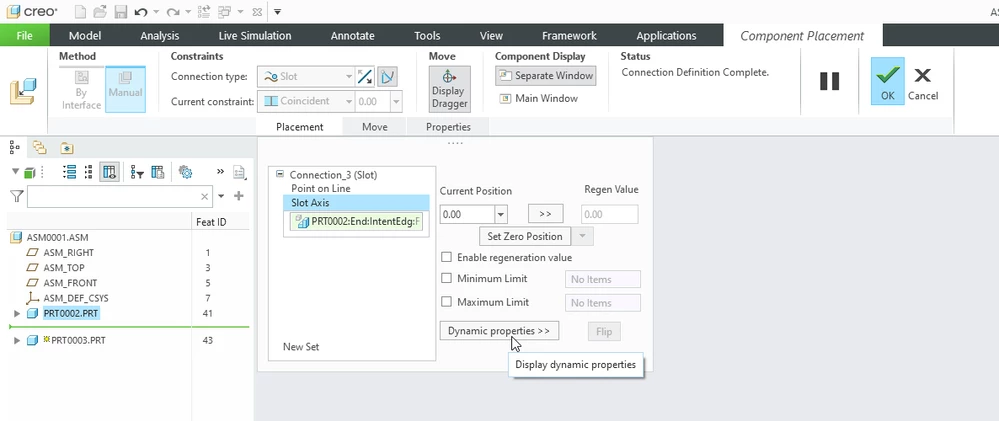
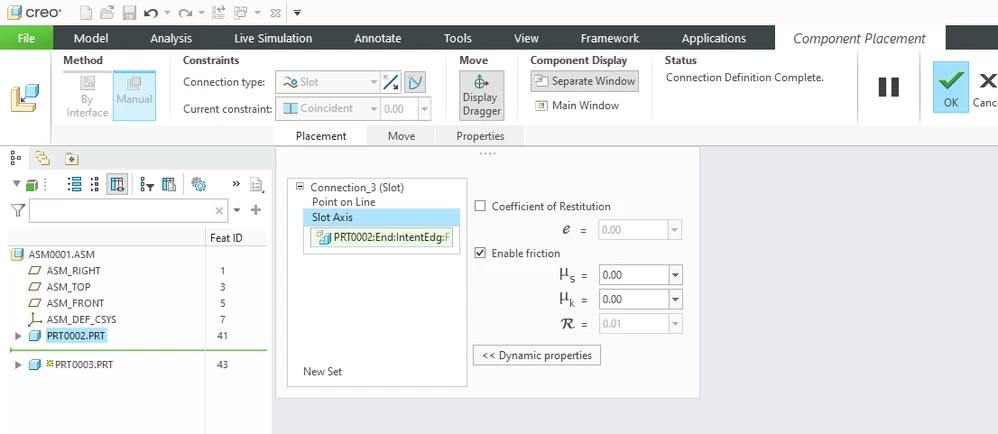
You can define the friction coefficients when defining the placement of the component in the assembly.  If already placed, Edit the Definition of that component.

Dynamic PropertiesDynamic PropertiesFriction coefficientsFriction coefficients


Please let us know if this helps,

Mike

2 replies

21-Topaz I
May 5, 2025
4-Participant
May 6, 2025

I'm working on Creo 9, I couldn't find any such option as Placement > Slot Axis > Dynamic Properties. Can you help me through navigate the process for inputing friction coefficient for slot connection. Do you thing I need to give any cam connect along with slot connection.


21-Topaz I
May 12, 2025

To better assist you, i recommend that you file a case.
If not me, our team will assist you.

4-Participant
May 7, 2025

VU_10973325_0-1746591521013.png

Here as stated where can I input friction for Slot-Follower

16-Pearl
June 10, 2025

Hi @VU_10973325 

You can define the friction coefficients when defining the placement of the component in the assembly.  If already placed, Edit the Definition of that component.

Dynamic PropertiesDynamic PropertiesFriction coefficientsFriction coefficients


Please let us know if this helps,

Mike

4-Participant
June 26, 2025

Hi Mike , Can help me in understanding how to select slot axis, because the friction has to applied on the helical curve, as that where contact happens, but in slot axis pop out, I'm unable to select the curve.