
1-Visitor
June 30, 2017
Question

Creo parametric cannot save part file

  • June 30, 2017
  • 1 reply
  • 9721 views

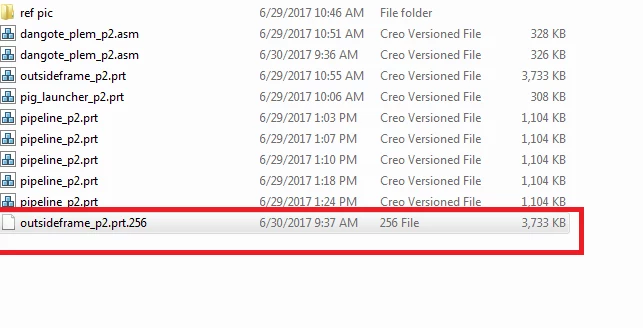
I have a pro blem when saving creo file. When I click on save. Creo parametric only generate a wrong file folder with the name of "XXX-part.Number". It cannot be open by creo. So all changes are lost. So pitty.


creo.PNG


1 reply

24-Ruby III
June 30, 2017

Hi,


1.]

outsideframe_p2.prt.256 is valid name of Creo part


2.]

The fact that you can see .256 extension means that Windows Explorer evaluated this extension as unknown.


3.]

If you set Windows Explorer to display known extension then all your files will be displayed with numerical extension.

Windows 7:

hide_extensions.png


4.]

What happens when you launch Creo and drag&drop outsideframe_p2.prt.256 file from Windows Explorer window to Creo graphics window ?


5.]

Can you upload your problematic file ? I can try opening it.


MH

Leslie1-VisitorAuthor
1-Visitor
June 30, 2017

Thanks for Ur quickly reply. can you give me your email address. The website does not allow to upload creo file.

24-Ruby III
June 30, 2017

Hi,


to upload file use Browse button located under editing area.


MH