
12-Amethyst
August 14, 2023
Solved

Creo Simulate - RAM allocation value is not reflecting in run summary

  • August 14, 2023
  • 1 reply
  • 2204 views

User is trying to allocate more RAM for his Creo Simulation by updating config.pro file, but it doesn't seem to be reflecting in run summary.
sim_solver_memory_allocation


Best answer by Sweetpeahub-old

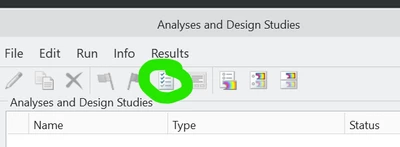
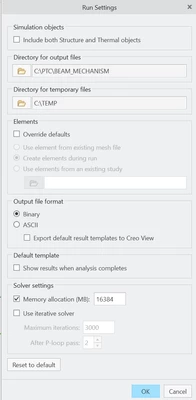
Always check this location shown in the image below. It takes precedence and is stored with the part file. Only new simulations will take the config file setting. (Max is currently 16384 MB by the way) [Also directory for output files and temp files are stored with the part file and may need to be reset if your new practice is different.]

If you run by batch file the command line option is like: -solram 16384

BTW Max RAM is not always optimal for speed.
 

Sweetpeahubold_2-1692025499615.png


Sweetpeahubold_1-1692025470165.png


1 reply

12-Amethyst
August 14, 2023

Always check this location shown in the image below. It takes precedence and is stored with the part file. Only new simulations will take the config file setting. (Max is currently 16384 MB by the way) [Also directory for output files and temp files are stored with the part file and may need to be reset if your new practice is different.]

If you run by batch file the command line option is like: -solram 16384

BTW Max RAM is not always optimal for speed.
 

Sweetpeahubold_2-1692025499615.png


Sweetpeahubold_1-1692025470165.png


Srivalli12-AmethystAuthor
12-Amethyst
August 21, 2023

Hi Sweerpeahub-old,


Thanks for the solution, this helped to resolve the issue.


Regards,

Sri.