
1-Visitor
March 27, 2020
Solved

Creo simulation problem with colors

  • March 27, 2020
  • 2 replies
  • 8100 views

I have a problem with colors in simulation results. This problem occurs when I want to show results with continuous tone. PC specs: CPU - i5 6600K, GPU - GTX 1060 6GB, W10 64bit, drivers are updated, I have tried also clean boot of Windows.
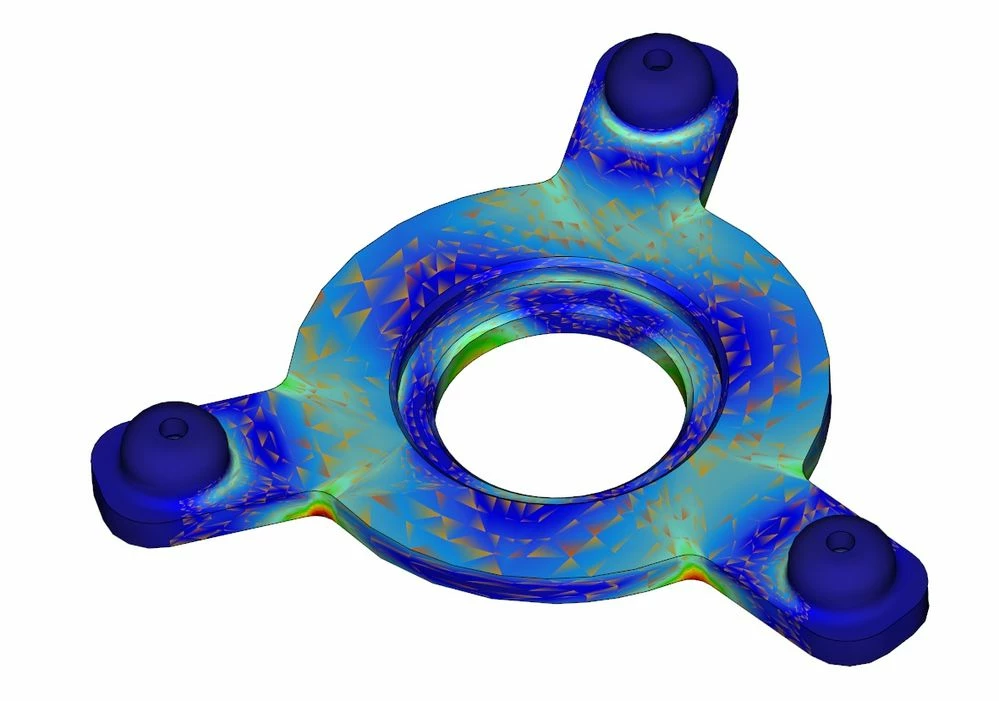
creo.jpg

Best answer by MichaelToledano

Answering myself 😉

Problem solved with Nvidia newest driver 451.48 for GPU Quadro P2000 (from 25.06.2020).


Regards, 

Michael

2 replies

17-Peridot
March 27, 2020

This could be a model setup problem.  Do other models do this for you or just this one particular model? Try a much coarser mesh and cyclic symmetry. (model 1/3 of this)  And is this Stress or Strain you are showing?  It looks like your mesh size is like traditional FEA (small) not P-element (larger).  What are your boundary conditions?  Stuff like this can happen for certain types of models so it may not be the graphics card.  Anyway we hope to hear back about what more things you have tried to fix this.

Rostislav1-VisitorAuthor
1-Visitor
March 27, 2020

Every model does the same thing. And this model I've sent to my friend and he has no problem with that. This is stress analysis, but it does the same thing with displacement etc..

17-Peridot
March 27, 2020

This may or may not be helpful..


https://www.ptc.com/en/creo-hardware-check

14-Alexandrite
April 3, 2020

I have never been a fan of continuous tone in any FEA software.  When PTC acquired Mechanica, PTC removed the capability to view unaveraged vs averaged stress contours.  With that said, you would never want to use continuous tone, because you cannot perform continuity checks.  However, since PTC no longer has unaveraged stress as an option to look at, then it really does not matter.  I admit, I have never seen that type of problem in Simulate.  What does the continuous tone look like if you turn on element edges?

Rostislav1-VisitorAuthor
1-Visitor
April 3, 2020

I think that there can be problem with my GPU. I tried Creo 5 and Creo 6 and the problem is still there. But on the other hand I have no issues with playing games etc...test.jpg

1-Visitor
April 24, 2020

This isn a screen resolution problem, set 1920x1080 in windows and try