14-Alexandrite
January 27, 2022
Solved

Defined Measures do not appear in a Random analysis?

  • January 27, 2022
  • 1 reply
  • 1860 views

To all


I created some measures (RMS disp, RMS accel - that sort of thing) but when I look at the results I see nothing . These do not appear in the list. 

I also would like to create a PSD response graph but again I am getting nothing.

The analysis ran succesffuly and all is Ok. I just do not get measures


Thanks
Best answer by SweetPeasHub

Hi @JXBWk ,

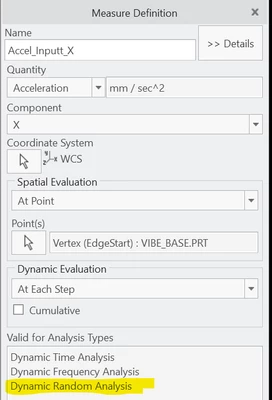
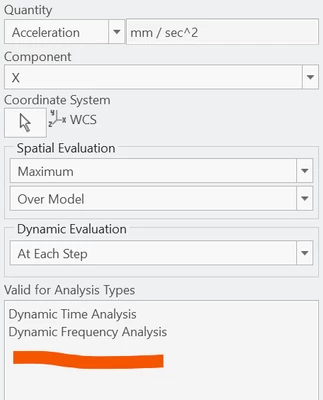
Do your measures show that they are valid for dynamic random? (see images below)

If yes, then did your normal modes analysis have stresses/rotations/reactions turned on? (it should warn you if you do not)

Did you check the box on the output tab for RMS displacements and stresses? (I am not sure about this one but usually I just check the RMS levels using this, not with measures)

Finally, did you specify the number of output steps on the output tab or use automatic? Maybe a problem there?


SweetPeasHub_1-1643643113789.png


SweetPeasHub_0-1643643023736.png


1 reply

17-Peridot
January 31, 2022

Hi @JXBWk ,

Do your measures show that they are valid for dynamic random? (see images below)

If yes, then did your normal modes analysis have stresses/rotations/reactions turned on? (it should warn you if you do not)

Did you check the box on the output tab for RMS displacements and stresses? (I am not sure about this one but usually I just check the RMS levels using this, not with measures)

Finally, did you specify the number of output steps on the output tab or use automatic? Maybe a problem there?


SweetPeasHub_1-1643643113789.png


SweetPeasHub_0-1643643023736.png


JXBWk14-AlexandriteAuthor
14-Alexandrite
January 31, 2022

tha nks. I see the difference now

17-Peridot
January 31, 2022

... and now I see even clearer. RMS levels are a single number so they will not show up as a PSD plot and so will not be available to plot. 

If you make a RMS measure it will only show up as a single value in the run summary as shown below. To get a PSD style plot you need the "at each step" option.


SweetPeasHub_0-1643648006343.png