14-Alexandrite
May 6, 2017
Solved

Fatal Error due to memory?
  • May 6, 2017
  • 3 replies
  • 4019 views

Good Morning

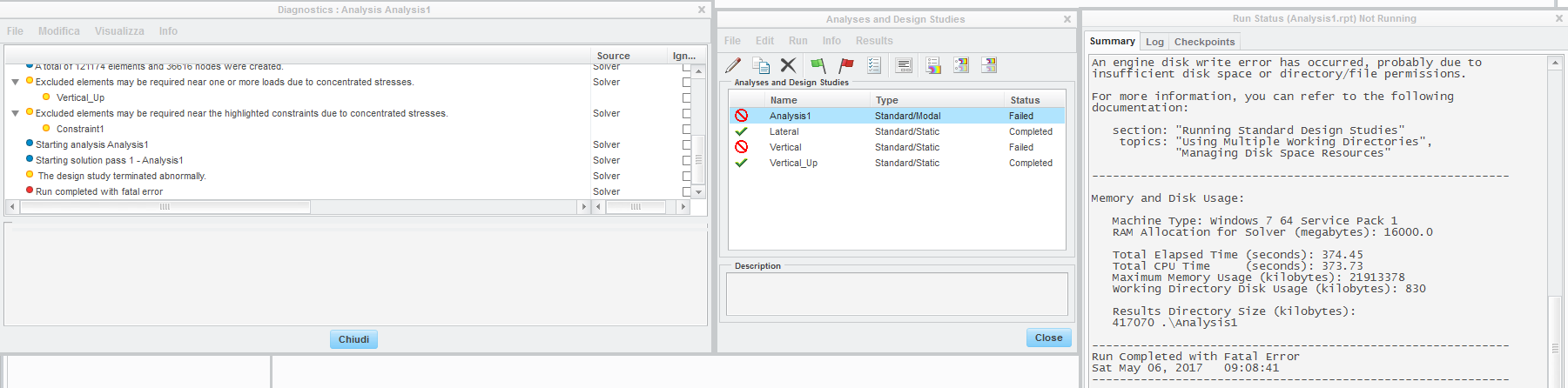
Can you help me to fixed this problem?

Thank you

Best Regards

Federico

Best answer by JonathanHodgson

The error references disk write, not memory.  What folder(s) is (are) set for temporary files and results; and does that (those) location(s) have plenty of space?

If it is a memory issue, you could try reducing your SOLRAM setting (currently 16000) - how much physical RAM do you have installed?

3 replies

15-Moonstone
May 6, 2017

You could try to increase the size of the Windows paging file and hence increasing the virtual memory available to the software.

In Windows 10 you can open an explorer window and select "This PC".
Then press the right mouse button and select the option "Properties".

2017-05-06_13-27-53.png

Then select "Advanced System Settings"

2017-05-06_13-30-22.png

Then select the tab "Advanced" and click on "Settings".

2017-05-06_13-31-35.png

Then select the tab "Advanced" and click on "Change" to alter the amount of virtual memory

2017-05-06_13-33-34.png

John Bijnens

KU Leuven - Technology campus Diepenbeek - Belgium

http://technologiecampusdiepenbeek.be

13-Aquamarine
May 8, 2017

The error references disk write, not memory.  What folder(s) is (are) set for temporary files and results; and does that (those) location(s) have plenty of space?

If it is a memory issue, you could try reducing your SOLRAM setting (currently 16000) - how much physical RAM do you have installed?

14-Alexandrite
May 9, 2017

My disk was full, so Simulate didn't run

Thank you, John and Jonathan