
1-Visitor
October 18, 2015
Solved

Fatal error encountered - Creo 3.0 on Windows 8.1

  • October 18, 2015
  • 2 replies
  • 10573 views

Hi,


I have problem with my Creo Parametric 3.0 - student version. When I run program I always get this window and Creo don't started.

Any ssuggestion or advice? Please.
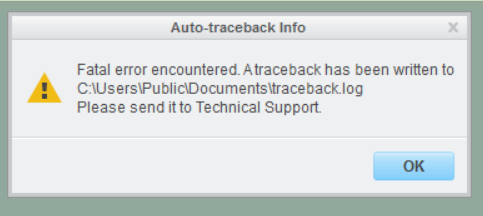
Capture.PNG


This thread is inactive and closed by the PTC Community Management Team. If you would like to provide a reply and re-open this thread, please notify the moderator and reference the thread. You may also use "Start a topic" button to ask a new question. Please be sure to include what version of the PTC product you are using so another community member knowledgeable about your version may be able to assist.
Best answer by Inoram

Something like this directory. It may be different for student edition, I do not have experience with that.

C:\Program Files\PTC\Creo 3.0\M050\Common Files\text

2 replies

Mahesh_Sharma
22-Sapphire I
October 19, 2015

Luka,

Is it happening just after launching Creo or when performing some action?

Not sure it is due to graphics or not. However making a test by adding config graphics as win32_gdi in config file may help.

ladanic1-VisitorAuthor
1-Visitor
October 30, 2015

It happening just after launching Creo.

What exactly should I do?

Thank you.

23-Emerald III
October 30, 2015

List your computer specs with graphics card information?

Desktop or laptop?

ladanic1-VisitorAuthor
1-Visitor
October 30, 2015

I have a laptop, Asus G550 running on Windows 8.1 pro, i7-4710HQ CPU, 16 gb RAM and graphical card is: Nvidia Geforce GTX 850M.

ladanic1-VisitorAuthor
1-Visitor
October 30, 2015

I have the same problem with installing any version of Catia and Abaqus. I know this is forum for PTC Creo, but I think it goes for the same problem...