1-Visitor
Jun 8, 2022 2:39 PM UTC
Solved

Flow anaylsis result coloring

Hi there, 
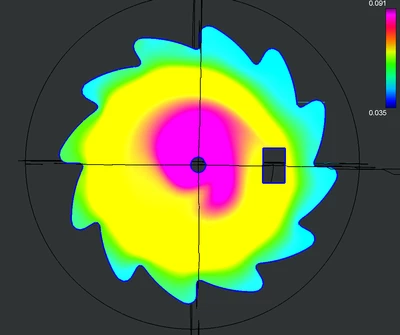
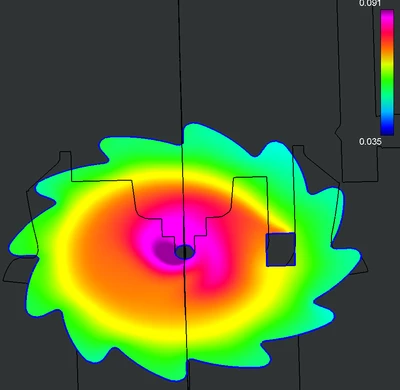
I've been having a bit weird issue. I'm using Section Views in postprocessing, and it keeps messing with the color representation of selected values (as seen on images below). When I tilt the surface to some extent, the colors are OK, but as I'm moving it back to perpendicular view, the colors change as if there was weird light reflection going on (which probably is). I have tried to turn off the lights in Scene Editor, but it did literally nothing for the Flow Anaylsis modue, as if it had some lightning on it's own. 
good.png

wrong.png


Any suggestion what might be wrong?
Thanks

cfdgeekAnswer
13-Aquamarine
Jun 8, 2022 7:41 PM UTC

Hi,


Creo flow analysis lighting settings are not coupled with the creo parametric rendering settings. I believe what you see is due to this direction is the lighting direction which lead to spot light reflection at this angle. I believe we fix this in creo 9, but could you create a ticket for this issue and we can take over and study it. Thanks.


3 replies

cfdgeek13-AquamarineAnswer
13-Aquamarine
Jun 8, 2022 7:41 PM UTC

Hi,


Creo flow analysis lighting settings are not coupled with the creo parametric rendering settings. I believe what you see is due to this direction is the lighting direction which lead to spot light reflection at this angle. I believe we fix this in creo 9, but could you create a ticket for this issue and we can take over and study it. Thanks.


Translate
Dawek1-VisitorAuthor
1-Visitor
Jun 8, 2022 7:48 PM UTC

Hi, 


Oh, I kinda guessed that might be the issue, so thanks for the confirmation. I'll be looking forward to getting hold of creo 9.

Translate
12-Amethyst
Jun 29, 2022 10:39 AM UTC

Hi,

the following spr SPR 13869138 HIGH was reported about, see article  at: https://www.ptc.com/en/support/article/cs353324

Translate