1-Visitor
October 20, 2021
Solved

Freewheel Mechanism

  • October 20, 2021
  • 1 reply
  • 3139 views

Hello everyone, 


As part of one of my projects, I need to simulate a mechanism, using Creo. This mechanism contains a freewheel, which is not made with ratchets, but with a specific bearing and I don't have the CAD model. 


My question is : is it possible to create a freewheel constraint on a pin connection in Creo Mechanism ? 


Thank you 


Julie 

French mechanical engineering student 
Best answer by SweetPeasHub

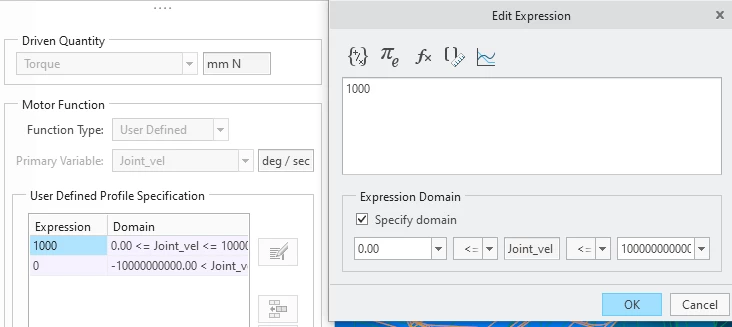
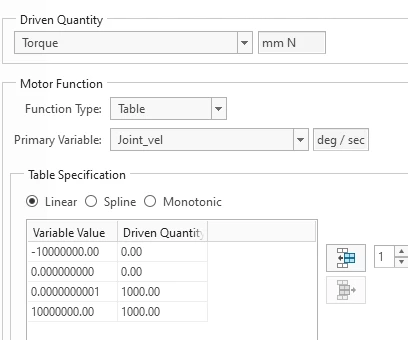
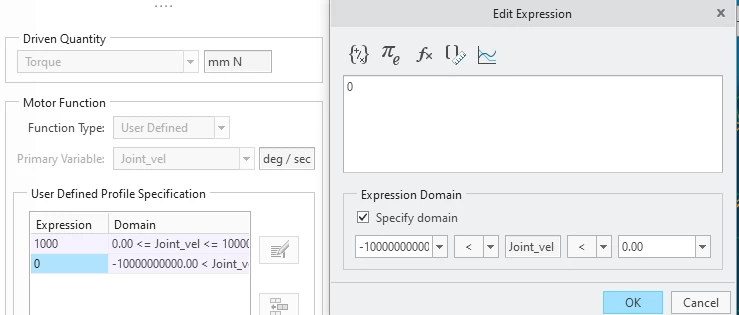
Here is how (two different ways) to put the conditional torque.  Be sure to include all the possible input range (I used -1E12 to 1E12 deg/s)


First way is user defined function. (key change primary variable from t to your measure)


Condition1Condition1


Condition2Condition2


Second way is by table. (key change primary variable from t to your measure)

Screenshot 2021-11-16 112854.png


1 reply

tbraxton
22-Sapphire II
22-Sapphire II
October 20, 2021

There is no predefined freewheel constraint in Creo. I presume you are referring to sprag clutch mechanism in the bearing.


If it is just a kinematic simulation then you just need to accurately represent the degrees of freedom.


One option is to use a conditional torque.

The torque will act on the rotating body only if the rotational velocity is either negative or positive, depending on which way you wish your clutch to freely rotate.


Create a measure of the rotating DOF joint rotational velocity (conditional test to transfer torque)

Create a torque on the rotational DOF joint which is only applied when the rotational velocity condition is true (direction of rotation for clutch engagement)

This will enable rotation freely in one direction and "lock-up" in the other


1-Visitor
October 21, 2021

Hi Tbraxton,


Thank you for your quick answer.

I created a measure of the rotating joint rotational velocity, but I don't know how to use this measure in a condition to apply the torque. In the torque function, I selected "user defined" and Creo does not accept only conditions. In other words, I don't know how to translate "If measure1>0; torque=1000; Endif" for Creo.


Have a nice day and thanks again


tbraxton
22-Sapphire II
22-Sapphire II
October 21, 2021

I do not currently have access to mechanism module and I do not know the UI interface from memory applicable to this.


The logic of the condition is implemented by specifying an Expression Domain for the torque to be applied.


Review this help link. Step 5 addresses how to define the domain on which the torque is applied.


http://support.ptc.com/help/creo/creo_pma/usascii/index.html#page/simulate%2Fmech_des%2Fmotors%2FTo_Define_a_User_Defined_Motor_Function.html%23