1-Visitor
November 28, 2016
Solved

Highlighted snap line(s) cannot be regenerated

  • November 28, 2016
  • 1 reply
  • 3469 views

I keep getting the warning message "highlighted snap lines can not be

regenerated" in drawing mode for some of our template models. However, no

matter what I do, I cannot see any snap lines, highlighted or not. Is there

some way I can get these snap lines to be visible so I can figure out why

they can't be regenerated?

currently im working on creo 3.0 mo90.

Thanks

SARAVANAN K
Best answer by mbonka

Hello SARAVANAN K

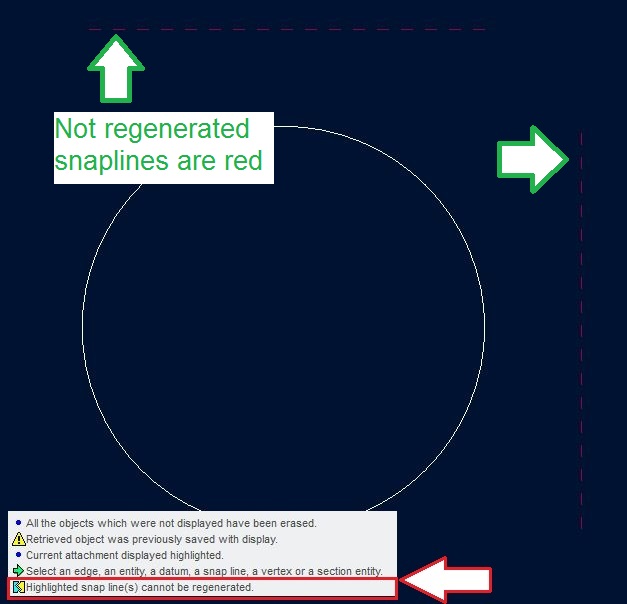
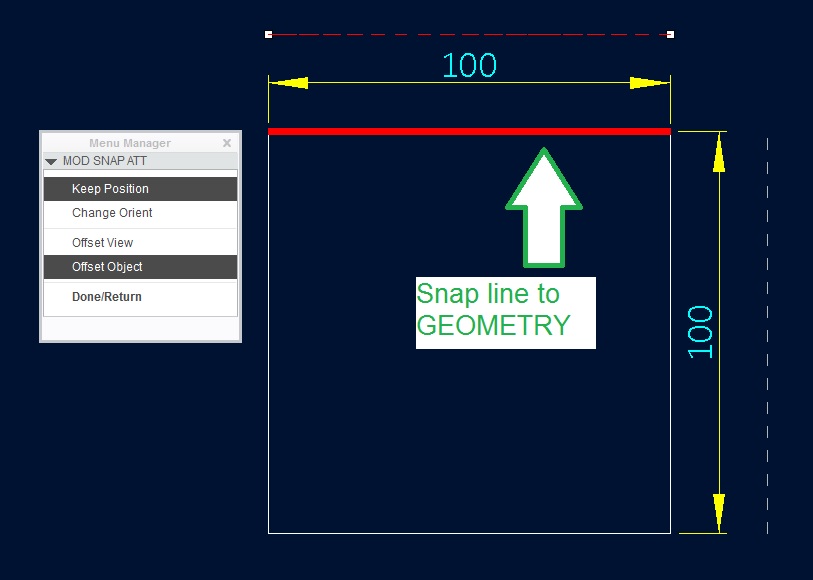
in my opinion snap lines where created in related to geaometry that is no more present in your model/drawing.

See following pictures:

1. Snapline created to Object/geometry

snap_line_01.jpg

2. Square geometry was replaced with circle

snap_line_02.JPG

From my praxis: Snaplines related to VIEW are much more consident that snaplines related to geometry.

Hope it can helps

Regards

Milan Bonka

1 reply

mbonka2-ExplorerAnswer
2-Explorer
November 29, 2016

Hello SARAVANAN K

in my opinion snap lines where created in related to geaometry that is no more present in your model/drawing.

See following pictures:

1. Snapline created to Object/geometry

snap_line_01.jpg

2. Square geometry was replaced with circle

snap_line_02.JPG

From my praxis: Snaplines related to VIEW are much more consident that snaplines related to geometry.

Hope it can helps

Regards

Milan Bonka

1-Visitor
September 20, 2017

I realize this is a past thread.  I found a good solution to locating snap lines.  While in a drawing do a CTRL-F or choose the Search Icon.  Search for "Snap Lines", by History, All.  Select them all and add them to the collector.  Close the Find Tool.  Select "DEL" or Right Click and Choose Delete.  If you have a multi-sheet drawing only snap lines found on the current sheet will be deleted.