
15-Moonstone
July 28, 2022
Solved

How to apply spring element?

  • July 28, 2022
  • 2 replies
  • 3067 views

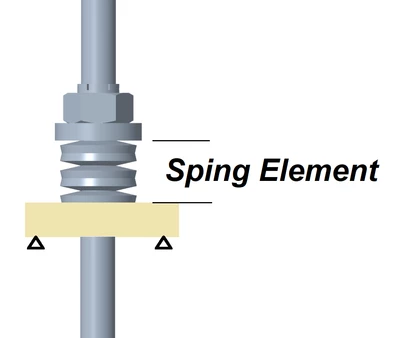
Kind of new to the Spring element in CREO Simulate. Is it possible to simply the 5 spring disc washers (see below illustration) with only one spring element? I have simply the rod as a series of beam elements.
JS_9824412_0-1659038114438.png


Thanks for any hints.

Best answer by Chris3

If you make the spring an advanced spring then you can enter in the spring matrix in any of the vector elements that you need.


A beam does the same thing only it uses the geometry and material properties that you have provided to generate those stiffness values.

2 replies

24-Ruby III
July 30, 2022

@VladimirPalffy Could you please take a look?

Chris3
21-Topaz I
August 1, 2022

You can add datum points along the rod's axis and then connect beams or springs to those datum points to give you the stiffness / spring properties that you are looking for.

15-Moonstone
August 1, 2022

Thanks.


One end of the spring element will be attached to one of the datum points that you have mentioned, the other end will be attached to a datum point added to the fixed supporting plate at the center of its through hole. This datum point is part of the plate through a rigid link or RBE2.


I am implementing the above now.


15-Moonstone
August 10, 2022

Still don't know how to assign the stiffness values for compression spring. So I temporarily used a hollow beam to connect the two points for representing the stack of spring washers. I am not sure yet how much errors it has caused.
