
15-Moonstone
Mar 2, 2022 8:09 PM UTC
Solved

How to change surface color of shell elements?
JS_9824412_0-1646251234371.png

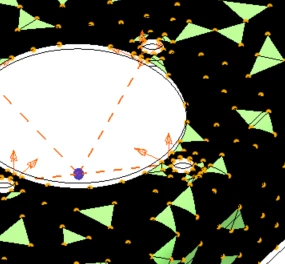
Hello! Is anybody know where to find the switch to set up surface color of shell elements shown in the above screenshot? I have searched the "Help" provided by PTC, but couldn't find an answer. This is Simulate 6. I have been running random vibe simulations.  Thanks. _JS
 

17-Peridot
Mar 3, 2022 4:25 PM UTC

SweetPeasHub_0-1646324699260.png


5 replies

17-Peridot
Mar 3, 2022 4:25 PM UTC

SweetPeasHub_0-1646324699260.png


Translate
15-Moonstone
Mar 3, 2022 4:37 PM UTC

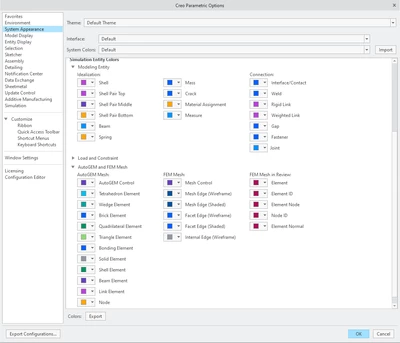
Hello, it looks like this is the only place to find the "switch". Those "simulation entity colors" don't work. Could you help to explicitly point out which switch has to be toggled? Thanks. 

Translate
17-Peridot
Mar 3, 2022 5:12 PM UTC

SweetPeasHub_1-1646328066707.png

Aha - your theme is black on white.


Translate