
1-Visitor
November 10, 2016
Question

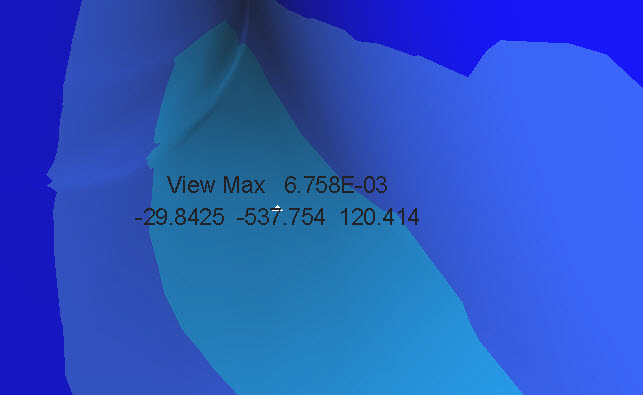
How to turn off location coordinates of view max in results window?

  • November 10, 2016
  • 2 replies
  • 3050 views

Hi,

Anyone know how to turn off the x y z coordinates for view max measurement in the results window in creo simulate 3.0?

Thanks,

Don Anderson

This thread is inactive and closed by the PTC Community Management Team. If you would like to provide a reply and re-open this thread, please notify the moderator and reference the thread. You may also use "Start a topic" button to ask a new question. Please be sure to include what version of the PTC product you are using so another community member knowledgeable about your version may be able to assist.

2 replies

2-Explorer
November 12, 2016

I assume you're using the dynamic query function? If so, set the environment variable "sim_pp_query_location" to "no" in the Configuration Editor (File -> Options -> Configuration Editor).

danderson1-VisitorAuthor
1-Visitor
November 14, 2016

Hi Shaun,

The switch you suggested had no effect.

I'm finding since we switched to Creo 3 M080 that "View Max", "View Min", "Model Max", and "Model Min" always show the location of the stress in x,y,z cords.

For presentations it would be nice to be able to turn this off so one's eye goes straight towards the value of stress, strain, displacement in question.

I looked at the other config options and have not found one that works to turn of the location information.

Any other thoughts or should I post a enhancement request?

Thanks,

Don Anderson

1-Visitor
November 22, 2016

This is very easy in Pro/mechanica 5.0,creo3.0,but I'm a Chinese. It's kind of difficult for me to describe.

1-Visitor
November 22, 2016

creo2m080_view_max.jpg

Creo Simulate 2.0 M080

danderson1-VisitorAuthor
1-Visitor
November 22, 2016

Hi Paul,

Yes, there's no issue regarding this in creo 2 or earlier,  only creo 3 and later.

Don