
15-Moonstone
May 11, 2019
Solved

Mechanism: User-defined measure not available in Motion Study

  • May 11, 2019
  • 1 reply
  • 6621 views

Hi, everyone. Here's hoping someone recognizes this problem.


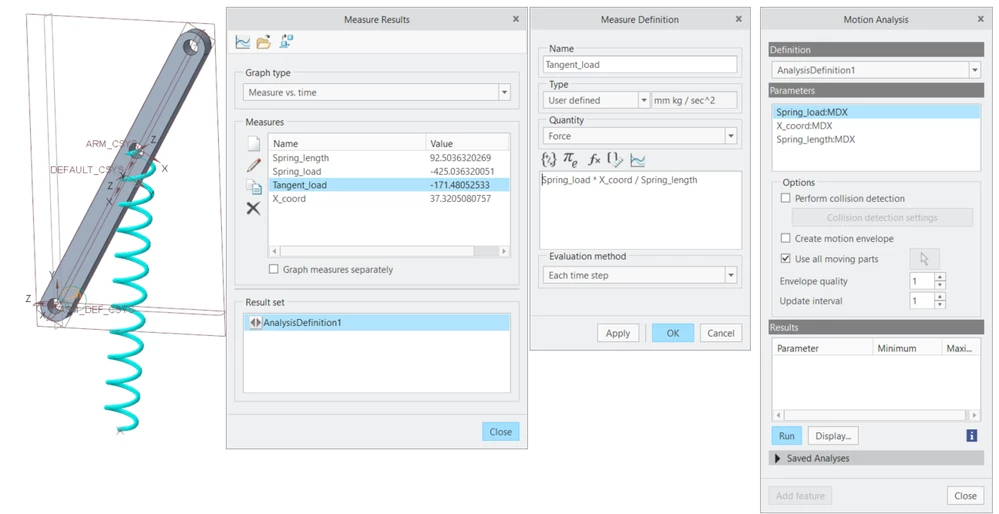
I have a simple assembly with an arm and a spring. I want to make a motion study measuring the force from the spring in the tangential direction that the arm is moving. To do this, I've set up some measures for the force of the spring, as well as some position measures that allow me to calculate the force component in the relevant direction. I've then set up a user-defined measure that looks like this:


Spring_load * X_coord / Spring_length


The Spring_loas measure is a Net Load measure for the spring. The X_coord and Spring_length measures are position measures.


So far so good. I can run a Dynamic Analysis and calculate my measure. I can pull up a graph and see how it behaves over the analysis time. But now I want to do an optimization study for this. To do this, I create a Motion Analysis. Now, in the area where I get to select my parameters, all the direct measures (Spring_load, X_coord and Spring_length) are there, but not my user-defined measure. What's even weirder, some troubleshooting shows me that if I remake my calculation to this:


X_coord / Spring_length


... I get to include it in my motion analysis. But as soon as I add the Spring_load measure in my calculation, it disappears from my motion study options. I'm able to use a derived measure based on position measures, but as soon as I add the spring force into the calculation, it can no longer be included in my analysis. Anyone have any idea of what's going on here?
 

arm.png

Best answer by SweetPeasHub

Its just a very annoying bug with a simple work around. 

Do not copy the measure from another measure.  Do not edit the measure with additional variables after apply/OK the first time.

In one step create a user measure from scratch with Spring_load*X_coorddp/Spring_length.

This should work, let me know if it doesn't for you.


Why?  I think there are data type issues not properly allocating space for the data series when the types change due to an edit.  Something is missing in the definition that does not pass into the CAD side.


As a note, there are two other ways to measure the force you are wanting.


1. net load on the servo motor getting torque.  Then a measure to divide by 60mm.  (or you can use a separation measure to get the 60mm distance but watch this bug turning up again if you edit/change the 60 constant to the separation measure. (create a whole new measure instead)


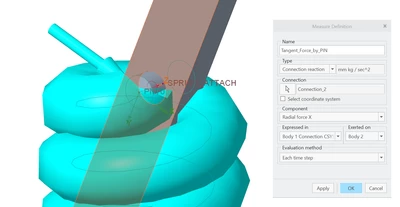
2. add a dummy pin part where the spring connects.  Get the connection reaction for the pin joint referenced to the moving arm. I prefer this because it is more directly obtaining what you want and will not have the bug that user defined measures can have.

Alternate.PNG


1 reply

17-Peridot
May 11, 2019

Within the user defined measure, had you set the measure unit?
It could be given by that.
In any case I don't be surprised by this because, for example (if I well remember) in Mechanism you can't utilize user defined measure not even for servo motors.
Monday I'm going to take it a look. Years have passed since I done my last motion analysis feature...

15-Moonstone
May 11, 2019

Thanks for your answer. Yes, I have set a unit, as you can see in the screenshot. I've tried setting it to both Force and Dimensionless, but it doesn't help. And the problem isn't that it's user-defined, since it works just fine if I remove the Spring_load from the calculation. As long as I work with just position measures it's fine, but when I add the net load measure, it's not available anymore. I's really weird.


For the moment, I managed to make a workaround since a spring force is so easy to calculate. I basically made my own Relation Analysis calculating the spring force and used that in my Motion Analysis, but that's not that elegant, and only works with such a simple thing as a spring. For other types of studies, that obviously wouldn't be an option, so I'm still hoping to figure out the issue here.


Thanks again for your attention. I expected this thread to not get any replies, so I was very happy to read yours!

17-Peridot
May 13, 2019

I've done some test and I'm not be able to utilize the "tangent_load" for optimization/feasibility study.
Even by specifying a relation with data taken from motion analysis


  • max_sping_load
  • max_x_coord
  • min_spring_length

I can't utilize it for the optimization.
It appears you can use only dimensions/parameters/measures directly created by Creo