
15-Moonstone
May 10, 2022
Solved

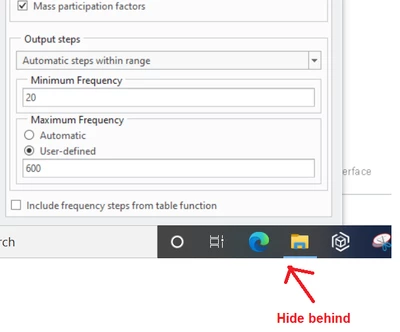
OK Button is not accessible
  • May 10, 2022
  • 1 reply
  • 2668 views

JS_9824412_1-1652186968453.png

Refer to the above screenshot, frequently the "ok" button and "cancel" button are outside of window and become inaccessible in Simulate. I have to close Simulate and restart it again. Is there any better way to access the "ok" button?


Thanks.

JS

P.S. BTW, in Simulate, the popup windows for selections (for example in assigning Rigid Links, Weighted Links, etc) are TOO small and can't not be dragged wide. Is there any better way to make the selection window wider?

 

Best answer by skunks

please press middle mouse button

1 reply

skunks
skunks19-TanzaniteAnswer
19-Tanzanite
May 10, 2022

please press middle mouse button

1-Visitor
January 8, 2023

what if i dont have any mouse? is there any other way that i could solve without it?

15-Moonstone
January 9, 2023

That is too complicated and is out of my expertise because I only use mouse and have been always using a mouse. I believe Skunks has the same situation. Therefore, find a mouse and use it is the better way. Also it is more efficient to pick hundreds of small facets and edges by using a mouse.