10-Marble
December 17, 2025
Solved

Optimize Spring in Mechanism with BMX

  • December 17, 2025
  • 2 replies
  • 189 views

Hello. I am simulating one beam model which rotates around an axis.

・A clock spring is set on the rotation axis.

・In MDO, beam model start to rotates upward once it start running


I would like to explore Minimum Spring Constant K (Nmm/deg)  that allows the beam model to rotate more than 40 degrees.

(no need to change Beam model dimension)


In this case, is it possible to obtain a solution for the spring constant K with BMX?

Or any other solution in Creo?


I try setting Spring constant K as BMX Goal by using relation. But it was not explored


This problem will be solved by hand calculations. However If a solution exists for this simple problem, I will apply the method to more complex problems . (to simulate Car Seat Tumble Motion)


Any advice would be greatly appreciated.
Best answer by Lewis_Maina_M

Hello, I am not sure which calculation you are performing but I will use an example to guide you on how to use BMX to get minimum K value for the Torsion Spring


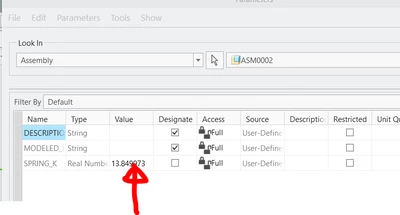
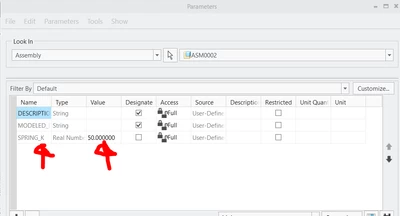
STEP 1:

Create a parameter called SPRING_K and assign it a random value 

Lewis_Maina_M_0-1767103981182.png


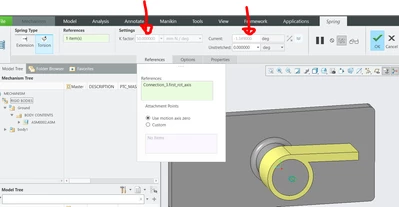
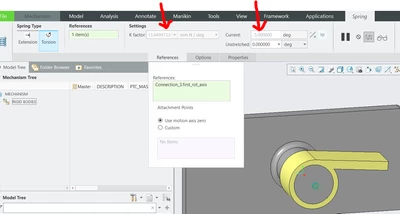
STEP 2:

Create Torsion spring and assign parameter created to K factor i.e #SPRING_K

Lewis_Maina_M_1-1767104162683.png


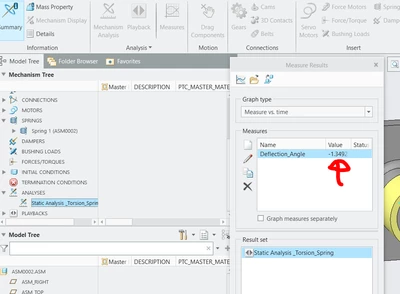
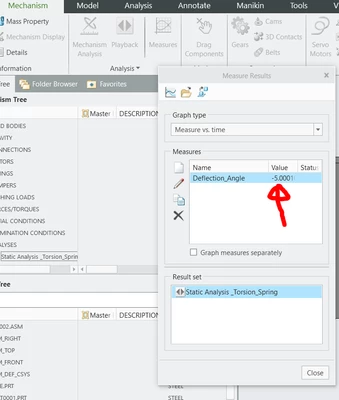
STEP 3 :Create a measure of twist angle  and run static analysis ensuring gravity is enabled and material properties assigned to the part

I will use BMX to determine K value which  will make twist angle to be -5 degrees (your case might be -40 or 40)

Lewis_Maina_M_2-1767104330193.png


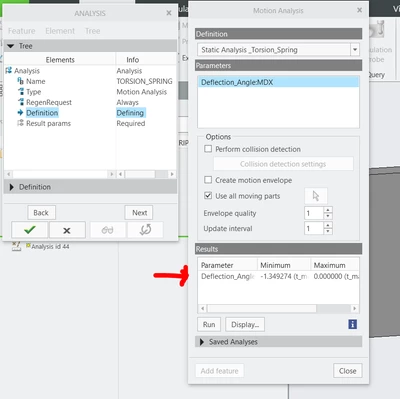
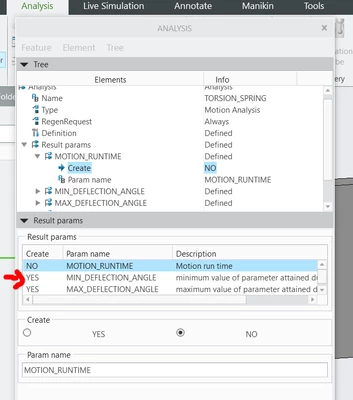
STEP 4:

Save mechanism and playbacks , open Analysis and create motion analysis. Create parameters . you should get MIN and MX parameters of mechanism measures

Lewis_Maina_M_3-1767104550139.pngLewis_Maina_M_4-1767104603980.png


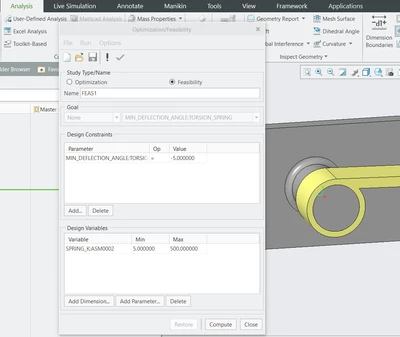
STEP 5 : Run feasibility analysis (you might need sensitivity analysis depending on complexity of the design). Add Your constraint (mine is -5 degrees) and Variable SPRING_K parameter (The one we used in the mechanism)

Lewis_Maina_M_5-1767104760652.png


Results: Analysis will change the parameter until your goal is met

Lewis_Maina_M_6-1767104819556.png


Validate Results by running Mechanism again:

Lewis_Maina_M_7-1767104872694.png


Lewis_Maina_M_8-1767104893211.png


Hope this helps.

 For more details watch this video:

https://youtu.be/I6-gE-WHZpE

2 replies

Catalina
Community Moderator
December 23, 2025

Hi @SK_13639906 

Thank you for your question. 

Your post appears well documented but has not yet received any response. I am replying to raise awareness. Hopefully, another community member will be able to help.

Also, feel free to add any additional information you think might be relevant. 


Best regards,

Catalina | PTC Community Moderator
13-Aquamarine
December 30, 2025

Hello, I am not sure which calculation you are performing but I will use an example to guide you on how to use BMX to get minimum K value for the Torsion Spring


STEP 1:

Create a parameter called SPRING_K and assign it a random value 

Lewis_Maina_M_0-1767103981182.png


STEP 2:

Create Torsion spring and assign parameter created to K factor i.e #SPRING_K

Lewis_Maina_M_1-1767104162683.png


STEP 3 :Create a measure of twist angle  and run static analysis ensuring gravity is enabled and material properties assigned to the part

I will use BMX to determine K value which  will make twist angle to be -5 degrees (your case might be -40 or 40)

Lewis_Maina_M_2-1767104330193.png


STEP 4:

Save mechanism and playbacks , open Analysis and create motion analysis. Create parameters . you should get MIN and MX parameters of mechanism measures

Lewis_Maina_M_3-1767104550139.pngLewis_Maina_M_4-1767104603980.png


STEP 5 : Run feasibility analysis (you might need sensitivity analysis depending on complexity of the design). Add Your constraint (mine is -5 degrees) and Variable SPRING_K parameter (The one we used in the mechanism)

Lewis_Maina_M_5-1767104760652.png


Results: Analysis will change the parameter until your goal is met

Lewis_Maina_M_6-1767104819556.png


Validate Results by running Mechanism again:

Lewis_Maina_M_7-1767104872694.png


Lewis_Maina_M_8-1767104893211.png


Hope this helps.

 For more details watch this video:

https://youtu.be/I6-gE-WHZpE

10-Marble
January 27, 2026

sorry for late reply
Thank you so much for the solution and video!
I didn't know we can make relation between the parameter and spring K by typing #+parameter name.