
5-Regular Member
November 19, 2025
Solved

Point Constraint Values Unreadable, Increase Size

  • November 19, 2025
  • 2 replies
  • 639 views

Hello, 


Whenever I print to pdf, the point constraints result plot lose part of its resolution, making them close to unreadable. Is there a way to increase the font size of those particular fonts bigger?


I have tried playing around with these config parameters with no luck:


default_ui_font 10
text_height_factor 40.000000
model_tree_font 10
Best answer by skunks

2025-11-21_measure.png

2 replies

Beuk5-Regular MemberAuthor
5-Regular Member
November 19, 2025

I managed to change the fonts of the menus, but the point constraint values stay the same.

19-Tanzanite
November 20, 2025

I don't know how to change the font size,

but I always use measured values on springs to ground for bearing reactions.


tutorial 


cf. page 39

19-Tanzanite
November 20, 2025

my workaround in creo simulate 2: screenshot


2025-11-20_simulate.png

Beuk5-Regular MemberAuthor
5-Regular Member
November 21, 2025

Thanks for your anwser skunks.


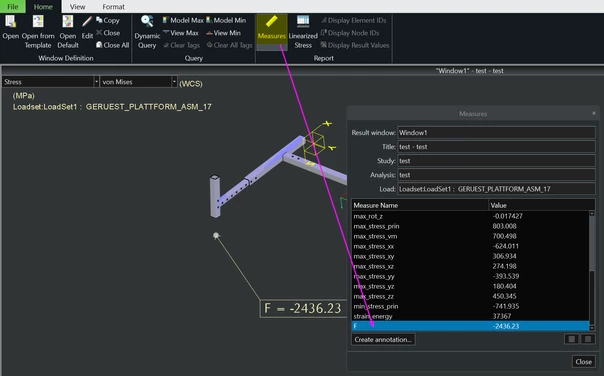
I am using Creo 10. I have swapped one of the point constraints for one "spring to ground". How do you manage to now see that spring force / ground reaction in the result window? Only way I can find that value is by using a measurement.

skunks19-TanzaniteAnswer
19-Tanzanite
November 21, 2025

2025-11-21_measure.png