
1-Visitor
June 9, 2016
Solved

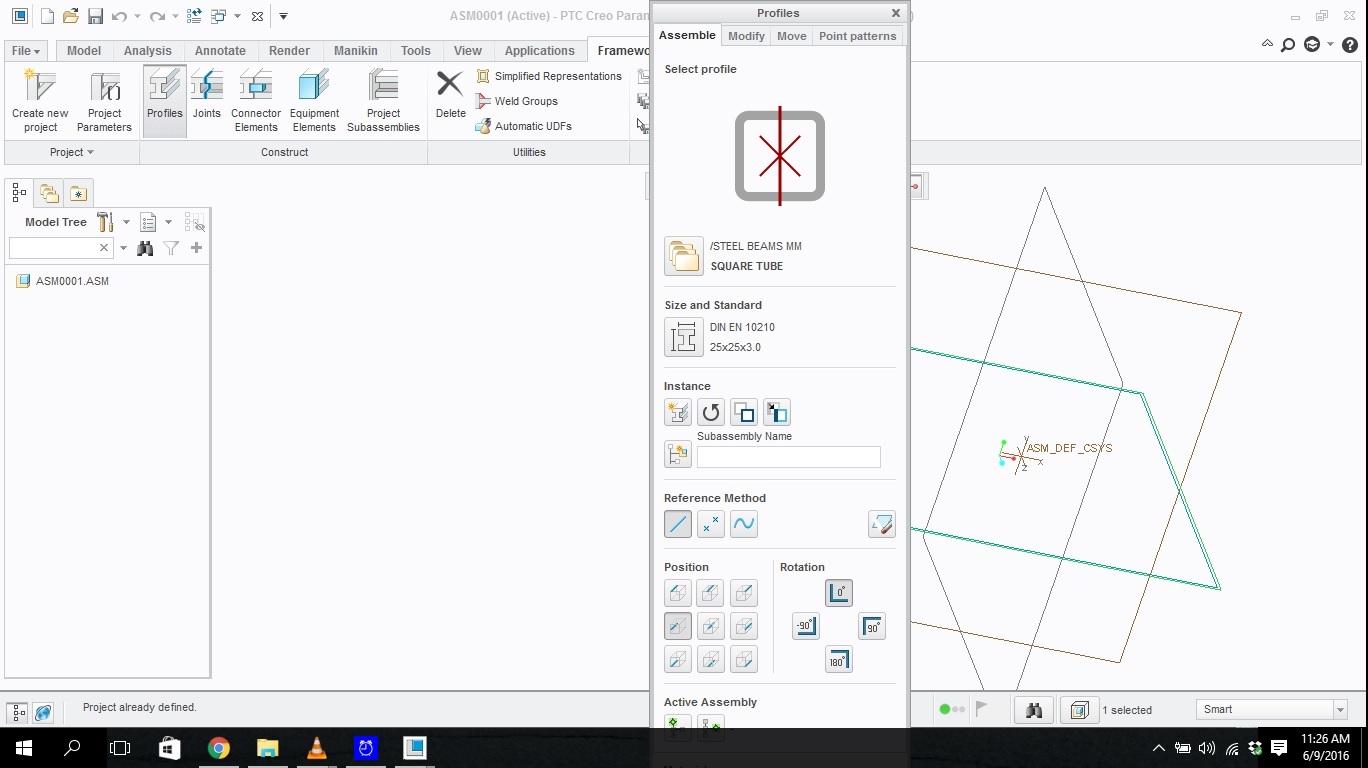
Pop up windows open too tall for my screen. What do I do?

  • June 9, 2016
  • 6 replies
  • 27017 views

Any time I open a tool or click on anything that opens a pop up window (such as the options button or currently the profiles function with in framework) the window opens up so tall that I can not see the bottom making it impossible to use. I cant even re-size or drag the window upward to be able to see the bottom. How do I fix this?problem.jpg
Best answer by Pieface

This is a bug.  I think we diagnosed it to have something to do with Windows 125% font size.  Attempt to put your cursor in the last possible area before "OK"/"Cancel" and press TAB.  Hope you select "OK".  I think the only solution is to change Windows font size back to default (100%).  I have seen it occur recently (Creo 3, Windows 7) but could not get it to re-occur.  It used to always happen in the Model Properties form (File>Prepare>Model Properties).

6 replies

5-Regular Member
June 9, 2016

Hi Nick,

Is this happening no matter what you are using on your computer?

Best,

Toby

nhughes1-VisitorAuthor
1-Visitor
June 9, 2016

Nope this is only happening in Creo.

24-Ruby III
June 9, 2016

Hi,

check screen resolution. It is probably too low to display large dialog boxes. If you are using notebook, you can attach external display to get bigger working area.

MH

nhughes1-VisitorAuthor
1-Visitor
June 9, 2016

I believe I have the resolution as high as it will go. I have a 32 in tv hooked up as a second monitor and it still isn't displaying correctly...

Thanks for the suggestions though.

18-Opal
June 9, 2016

‌Buy a bigger monitor?

    Not helpful, I know....  I just couldn't help myself.

21-Topaz II
June 9, 2016

This looks like a Creo question, not a Community noe.  Toby Metcalf‌, should it be moved to one of the Creo areas?

I'd check your screen resolution.  Creo requires a 1280 x 1024 resolution or higher.

http://support.ptc.com/WCMS/files/161492/en/creo3_hw_notes.pdf

nhughes1-VisitorAuthor
1-Visitor
June 9, 2016

My resolution is set to 1366 x 768.

21-Topaz II
June 9, 2016

That's your problem.  If that's the highest it'll go, there's nothing that can be done.

Pieface1-VisitorAnswer
1-Visitor
June 13, 2016

This is a bug.  I think we diagnosed it to have something to do with Windows 125% font size.  Attempt to put your cursor in the last possible area before "OK"/"Cancel" and press TAB.  Hope you select "OK".  I think the only solution is to change Windows font size back to default (100%).  I have seen it occur recently (Creo 3, Windows 7) but could not get it to re-occur.  It used to always happen in the Model Properties form (File>Prepare>Model Properties).

1-Visitor
November 26, 2017

Thanks very much! This suggestion worked for me - on my 1920x1080 laptop display, the Creo-4 windows are correctly sized now. My font size was at 150% when the problem apeared after first install of Creo 4. I changed the text size to 125% based on your response so that my text size would not be too small for my other programs and it worked great - if anyone needs where to change the font size, please see the attached picture. Thank you again -


1-Visitor
February 20, 2019
This is an old post but someone else might be able to use my suggestion. I ran into the same issue amd my available laptop resolution causes me to not have access to some of the bottom parts of pop up menus. I switched my layout to profile, was able to access the part of the window I wasn't able to previously, then switched back to landscape. It's a bit of a pain to navigate but it worked.