

1-Visitor
March 20, 2012
Question

problems of analysis with Pro/mechanica

  • March 20, 2012
  • 4 replies
  • 5409 views

Hi everybody

I just created a static analysis with Pro/mechanica ( with Wildfire 4) and I face 2 problems

in the results
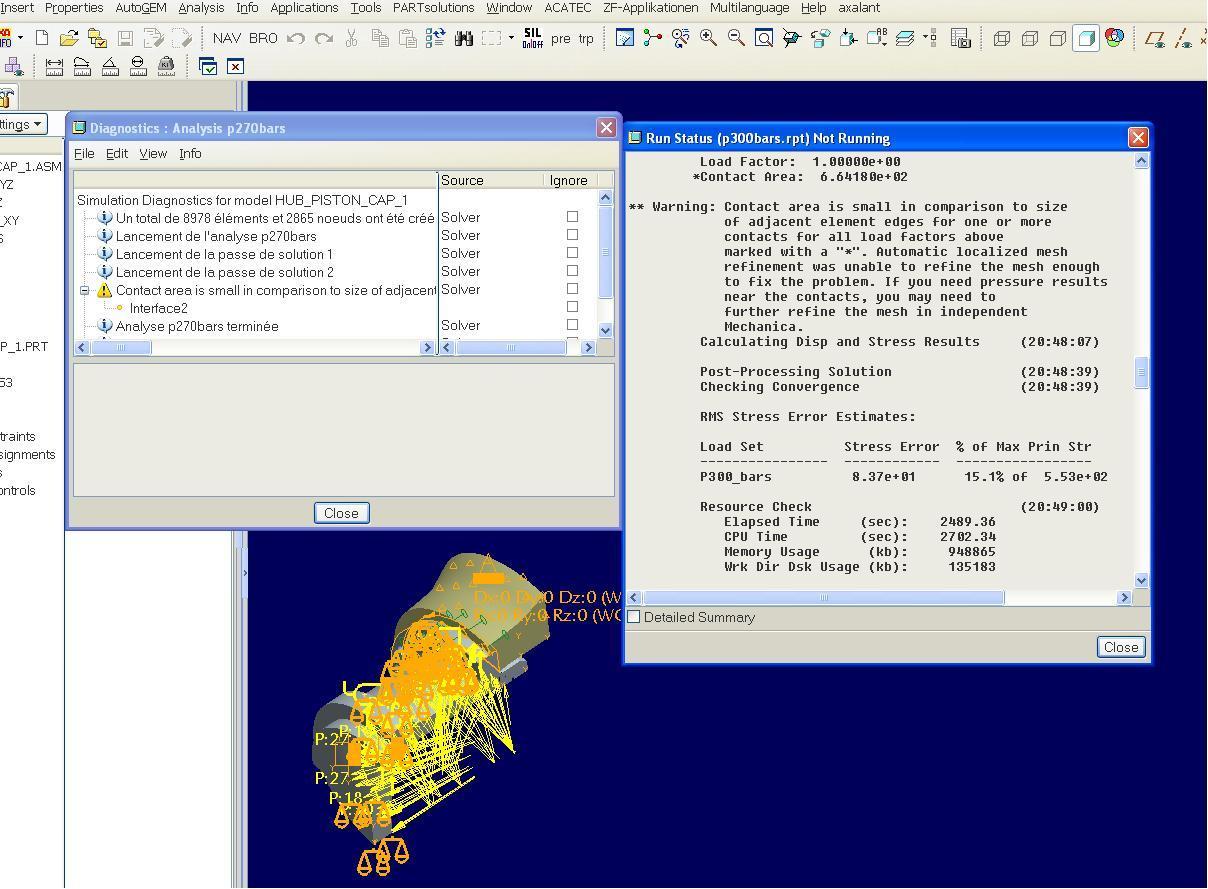
problemes1.JPG

1 ) in the folder " diagnostic" , I have a message sayinf the contact area is small in comparison of the size adjacent elements

2 ) in the folder " run status'" , I have a stress error of 16.3 % ( according to PTC the maximum must by 5%)

To solve the firstr problem , I have cteated a control AUTOgem on the 2 faces included to define a max size of the elements , I want to know if it's the correct method or if an other one is better ( witch one ?)

For problme 2 , I don't know what to do , I have just notice that with the AUTOgem control to solve problme 1 , the % of stress error decrease to 12.3 % , bt I dont kno wwhat I have to do to be bellow 5 %

If anyone konw the solutions for my 2 problmes , it will be great if you can explain me

By advance , many thanks for your help

Olivier


This thread is inactive and closed by the PTC Community Management Team. If you would like to provide a reply and re-open this thread, please notify the moderator and reference the thread. You may also use "Start a topic" button to ask a new question. Please be sure to include what version of the PTC product you are using so another community member knowledgeable about your version may be able to assist.

4 replies

13-Aquamarine
March 20, 2012

I find AutoGEM controls very good for improving stress results.

'Maximum element size' and 'Edge length by curvature' are both useful - 'by curvature' is good for stress concentrations in corner radii.

For contact analysis, you can also try creating several layers of surface or volume regions around the contact - then you can set a very small Max Element Size in the inner region, a slightly larger size for the next region, and so on.

Creating small elements in one specific area also seems to be efficient for run time, compared to other methods of improving accuracy.

HTH!

1-Visitor
March 21, 2012

Yes, contact analyses are very sensitive to element size, especially in high curvature regions, as the contact algorithms usually look at how nodes pass through element faces. +1 on Jonathan's suggestions on AutoGEM controls.

To reduce the error %, try more elements in the regions where the stress gradients are high. And/or, try changing AutoGEM > Settings... > Limits > Allowable Angles: Change the 'Max' angles to 150 deg, and the 'Min' angles to between 20 and 27 deg. For 'Min' angles, I usually use 25 deg, which is about the highest that meshing will succeed with complex geometry.

Also change Max Aspect Ratio to 7 (although this is usually redundant, as the Min angle constraints will keep the ARs low.)

The angle controls will result in a lot more elements, so longer solve time and more memory required, but the solution will be cleaner. To some extent, depending on geometry, the angle settings will negate the need for AutoGEM controls on element size, as most come out small anyway.

opavot1-VisitorAuthor
1-Visitor
March 23, 2012

Dear all

Many thanks for explanations , I will test all your solutions as soon as possible

Olivier

opavot1-VisitorAuthor
1-Visitor
May 4, 2012

Dear All

after some testings , I have now a stress error of 4.3 % ( I simply play with the limits of the autoGEM parameters )

Now I face a new problem , when I want review the result , I hav a window with the text " none of the windows of results selected can be show "

Do you know or did you already face this problem and if yes do you have a solution for it ?

many thanks for your help

Olivier

1-Visitor
May 9, 2012

Bonjour Olivier,

I see something strange in your picture:

the name of the analysis in the diagnostic window does not correspond to the one in the run status window.

Image1.jpg

Your problem of results could maybe come from this issue.

opavot1-VisitorAuthor
1-Visitor
May 23, 2012

Dear All

Sylvain is right , I have mixted 2 studies in my picture but the problem true

For more information , I have checked the "status studie" and the " diagnostic " files

they are OK wit the sentence " run completed " at the end

problem.JPG

Now mayby the file is too big for my computer but I don't know the way to check it

If you could help me

Best regards

Olivier

1-Visitor
May 23, 2012

Olivier,

Take a look in the analysis report file. It has a .rpt extension.
It's located in the directory created for the analysis results.

Open it up with a text editor. Torwards the end of the file you should see a heading called

Memory and Disk Usage:

Look for a lines called:

Maximum Memory Usage (kilobytes):

Working Directory Disk Usage (kilobytes):

Compare these values to your Windows Task Manager: Commit Charge Limit (k) value and your free harddrive disk space.

This should shead some light on if you are running out of memory or disk space.

Don Anderson