
21-Topaz II
December 29, 2016
Question

Repeat Region Filter for "Included" Components

  • December 29, 2016
  • 2 replies
  • 2717 views

Creo 2, M230

I have two components in this assy that I want on the BOM but not to show in the 3D assy. So, I've used the "include" function which adds the part to the assy without actually assembling it.
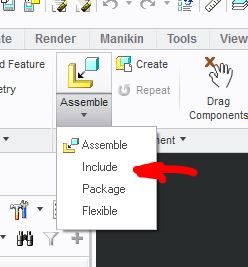
Capture.JPG

When I create my BOM in the drawing, I'd like a way to distinguish them because they will not be shown on the exploded view.  Ideally they'd be at the end of the BOM as well.

I'm thinking some kind of relations that finds "included" components and makes their index "NS" (Not Shown) or something like that. How are others doing this?  Is there a way to find included items via repeat region relations?

Message was edited by: Doug Schaefer - Image added

2 replies

21-Topaz II
December 29, 2016

OK, I'm closer. 

First, these are called "unplaced" components, which helped in searching.

Second, I discovered that this works:

IF asm_mbr_location_all_views == "-"

index = "NS"

ELSE

index = rpt_index

ENDIF

One problem is that it will pick up hidden components too.  Ideally I'd like to find the unplaced directly, but I think I can make this work.

However, the index numbers are still assigned and there are then gaps in the list:

Capture.JPG

Any way to correct that?  I may have to filter them out and add a second table that only includes those unplaced items.

23-Emerald III
December 29, 2016

Lock the table before adding those components to the assembly. Then add them and they should go to the top of BOM.

21-Topaz II
December 29, 2016

I was able to make that work by suppressing them, fixing the index on the region and resuming them.

Still wish there was a more direct way, but I think I can make these options work.

1-Visitor
January 24, 2017

You could add a row at the bottom of the table and create a new repeat region. The you could filter it to only show the "not shown" parts.